


.png)
.png)
Talk to the experts
Learn more about Extend and find out if it's the right solution for your business.
August 13, 2026 3:32 PM
.png)
A year ago, your company's AI software spend was probably one or two line items: maybe an LLM API key for a developer project and a single enterprise license. Today, the picture likely looks very different.
Marketing is paying for an AI copywriting tool. Sales ops is running multiple AI-powered prospecting platforms. Engineering has a stack of API credits burning across several model providers — powering AI coding assistants and automated pull request reviews. Finance is evaluating AI-assisted FP&A software. And someone in HR just signed up for an AI-driven recruiting tool on the company card.
The tools themselves aren't the problem. Most are likely delivering genuine productivity gains. The problem is visibility.
AI software spending comes in unusual shapes, like usage-based API fees that fluctuate month to month with call volume, per-seat SaaS subscriptions, one-time credit packs that quietly roll over, and it doesn't fit cleanly into traditional expense categories. Because AI tools spread fast, often team by team with informal procurement, the spending shows up fragmented: across shared corporate cards, personal cards submitted for reimbursement, and departmental budgets that weren't sized for it.
By the time the CFO asks "how much are we actually spending on AI tools?", the honest answer usually requires a manual inventory. And that inventory takes days to compile, and still might miss things.
The instinct when a team needs a new software subscription is to give them a shared corporate card number, or ask them to pay personally and submit receipts. Both approaches share the same core flaw: accountability is retrospective.
With a shared card, multiple people and tools charge to the same account number. There's no way to tell from the statement which team drove which cost, or which AI tool is generating value versus quietly burning budget. Reconciliation becomes a matching exercise — trying to map statement line items to a list of tools that may or may not be documented anywhere.
With employee reimbursements, the data problem is different but equally frustrating. Employees submit receipts with varying levels of detail. The submission lag means costs land in the books weeks after they were incurred. If an AI subscription is billed monthly but submitted quarterly, your actuals are always running behind your accruals. And the free-text description field on an expense form — "AI tools, March" — tells finance nothing useful.
Neither approach gives you real-time visibility or clean attribution. You're accounting for AI spend after the fact, rather than managing it proactively.
The most effective change most finance teams can make is also the most straightforward: issue a dedicated virtual card for each AI tool subscription, and assign it to the person or team accountable for that tool.
This sounds simple, but the downstream effects are significant. When your LLM provider charges to its own card, and your AI writing tool charges to a different one, and your analytics platform charges to a third — every line item is already attributed. No need to match anything manually, or constantly have to ask "which card did that hit?" during close.
Dedicated cards also let you put controls directly on each subscription:
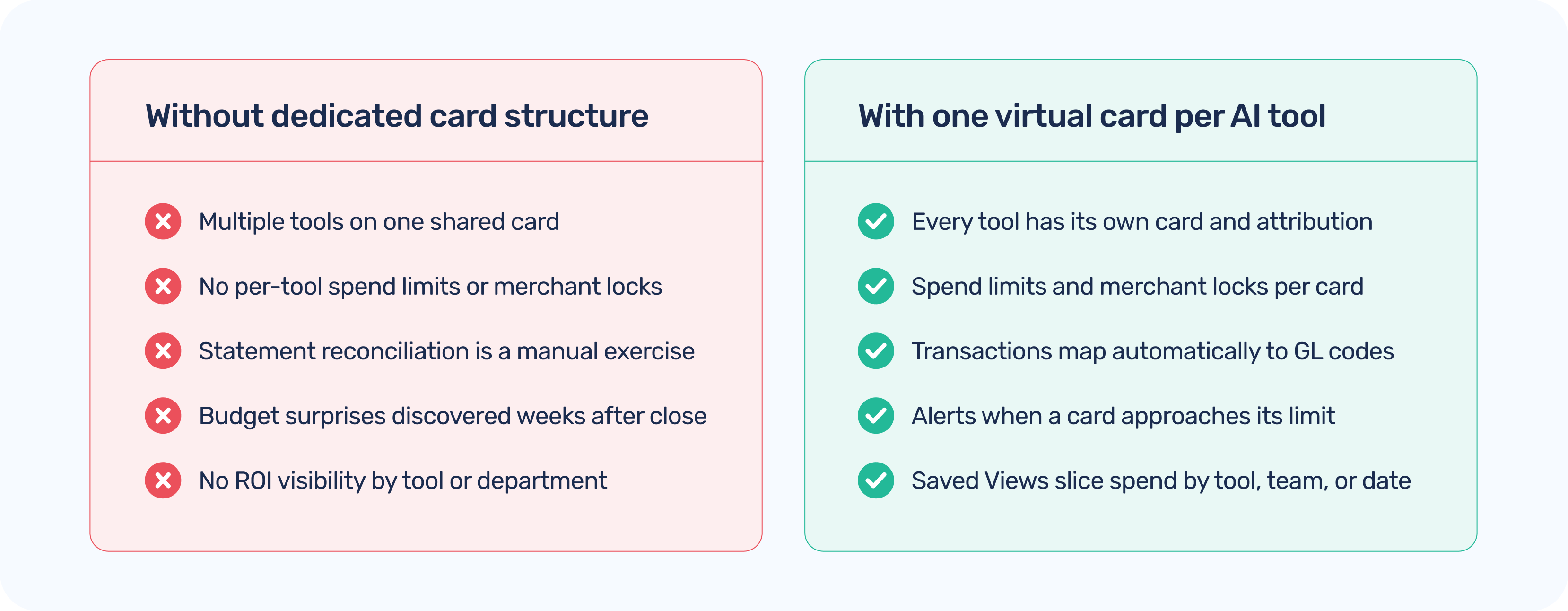
For teams still evaluating which AI tools they actually need, virtual cards make responsible trials easy: issue a card with a small limit, run the evaluation, and close the card if the tool doesn't make the cut. No residual subscription quietly billing on a shared card after a trial goes stale.
Knowing the dollar amount is just the start. To meaningfully evaluate AI spend and answer the question "are we getting what we paid for?", you need expense data that carries more context than "software subscription."
This is where custom expense fields become important. When every AI transaction carries structured tags for department, use case, billing model, and owner, you can answer questions that matter to both finance and leadership:
Extend's Additional Fields for Expense Capture let you configure custom data fields on every transaction, so your AI spend carries exactly the context your finance and operations teams need, without requiring employees to submit separate forms or fill out a free-text description field that nobody reads consistently. The tags are structured, queryable, and feed directly into your accounting integrations.
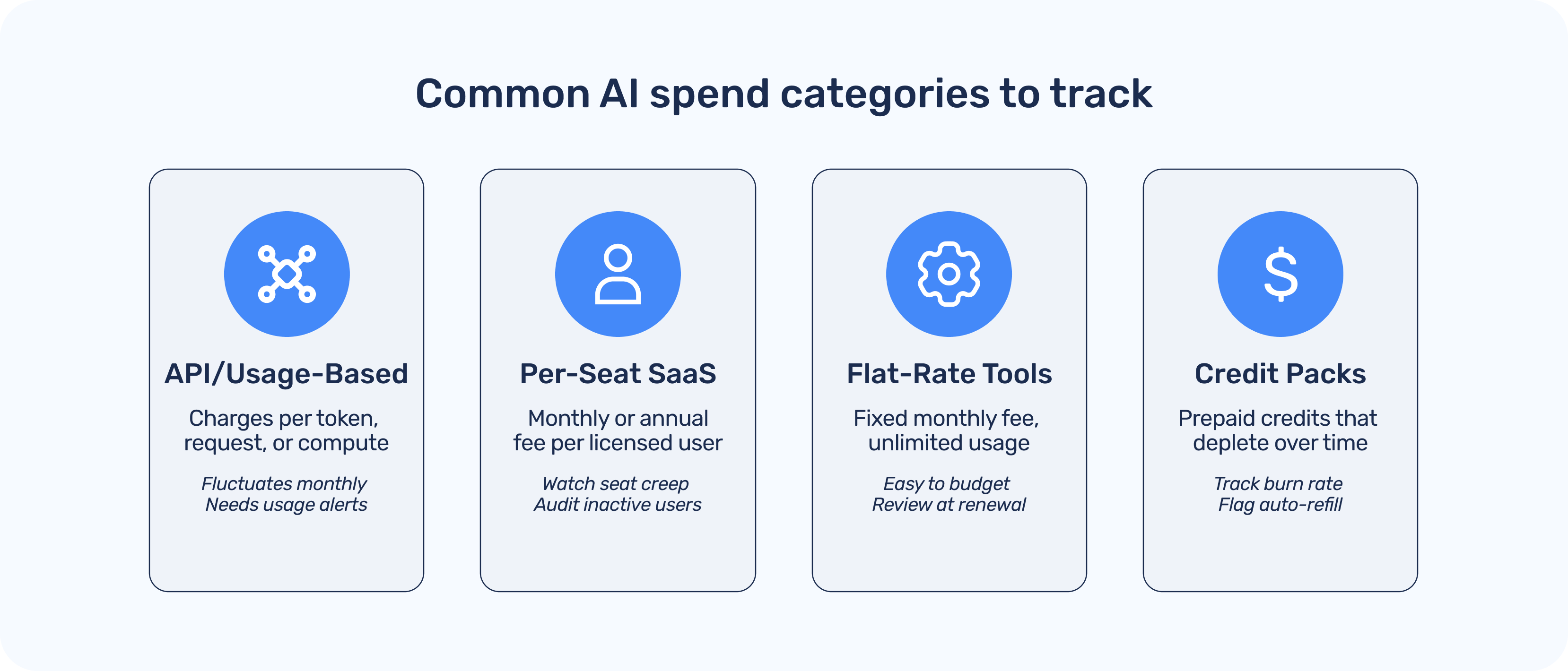
Even with the right card structure and expense tagging in place, AI spend still has to flow into your books. And if that process is manual, forcing your team to still download statements, copy data into your ERP, and match to GL codes, you're creating a monthly reconciliation task that grows with every tool you add.
The cleaner path is a direct integration between your card and expense platform and your accounting system.
When virtual card transactions sync automatically to your accounting system — with the right GL codes and custom field data already attached — reconciliation becomes a review step rather than a data entry exercise.
.png)
This matters especially for AI spending because usage-based tools often charge in real time. A month of heavy API usage might hit the card mid-month. If your reconciliation process runs once after close, you're already half a period behind. Real-time transaction sync means finance can see what's happening as it happens — which is increasingly the expectation when CFOs are being asked to forecast AI spending the same way they forecast headcount.
Extend is built for exactly this kind of spend and expense management challenge. You can issue virtual cards in seconds, assign them to specific tools and team members, and set per-card spend limits that enforce your policy automatically.
As AI tools charge their subscriptions, transactions sync automatically to your accounting integration, whether it's QuickBooks Online, QuickBooks Desktop, NetSuite, Xero, Sage Intacct, or Microsoft Dynamics 365 Business Central, with the custom expense field data your team configured. The data arrives clean, coded, and attributed, so your close process doesn't require a manual reconciliation sprint.
Saved Views in Extend also let you monitor AI spend across your entire card portfolio without running custom reports. Filter by department, time period, or billing model, and the data will be right there, because it was structured correctly from the moment each card was issued. You can also use spend alerts to get notified when a card approaches its limit, so a usage spike or an unexpected price increase shows up as a notification rather than a budget surprise.
Getting AI spend under control doesn't require a new procurement system or a six-month implementation. It starts with the right card structure, the right fields, and the right accounting integrations. Extend puts all three in one place. Issue virtual cards, set spend limits, and get clean accounting data — without changing how your teams work.
Dawn Lewis
Controller at Couranto
Bridget Cobb
Staff Accountant at Healthstream
Brittany Nolan
Sr. Product Marketing Manager at Extend (moderator)

A year ago, your company's AI software spend was probably one or two line items: maybe an LLM API key for a developer project and a single enterprise license. Today, the picture likely looks very different.
Marketing is paying for an AI copywriting tool. Sales ops is running multiple AI-powered prospecting platforms. Engineering has a stack of API credits burning across several model providers — powering AI coding assistants and automated pull request reviews. Finance is evaluating AI-assisted FP&A software. And someone in HR just signed up for an AI-driven recruiting tool on the company card.
The tools themselves aren't the problem. Most are likely delivering genuine productivity gains. The problem is visibility.
AI software spending comes in unusual shapes, like usage-based API fees that fluctuate month to month with call volume, per-seat SaaS subscriptions, one-time credit packs that quietly roll over, and it doesn't fit cleanly into traditional expense categories. Because AI tools spread fast, often team by team with informal procurement, the spending shows up fragmented: across shared corporate cards, personal cards submitted for reimbursement, and departmental budgets that weren't sized for it.
By the time the CFO asks "how much are we actually spending on AI tools?", the honest answer usually requires a manual inventory. And that inventory takes days to compile, and still might miss things.
The instinct when a team needs a new software subscription is to give them a shared corporate card number, or ask them to pay personally and submit receipts. Both approaches share the same core flaw: accountability is retrospective.
With a shared card, multiple people and tools charge to the same account number. There's no way to tell from the statement which team drove which cost, or which AI tool is generating value versus quietly burning budget. Reconciliation becomes a matching exercise — trying to map statement line items to a list of tools that may or may not be documented anywhere.
With employee reimbursements, the data problem is different but equally frustrating. Employees submit receipts with varying levels of detail. The submission lag means costs land in the books weeks after they were incurred. If an AI subscription is billed monthly but submitted quarterly, your actuals are always running behind your accruals. And the free-text description field on an expense form — "AI tools, March" — tells finance nothing useful.
Neither approach gives you real-time visibility or clean attribution. You're accounting for AI spend after the fact, rather than managing it proactively.
The most effective change most finance teams can make is also the most straightforward: issue a dedicated virtual card for each AI tool subscription, and assign it to the person or team accountable for that tool.
This sounds simple, but the downstream effects are significant. When your LLM provider charges to its own card, and your AI writing tool charges to a different one, and your analytics platform charges to a third — every line item is already attributed. No need to match anything manually, or constantly have to ask "which card did that hit?" during close.
Dedicated cards also let you put controls directly on each subscription:
For teams still evaluating which AI tools they actually need, virtual cards make responsible trials easy: issue a card with a small limit, run the evaluation, and close the card if the tool doesn't make the cut. No residual subscription quietly billing on a shared card after a trial goes stale.
Knowing the dollar amount is just the start. To meaningfully evaluate AI spend and answer the question "are we getting what we paid for?", you need expense data that carries more context than "software subscription."
This is where custom expense fields become important. When every AI transaction carries structured tags for department, use case, billing model, and owner, you can answer questions that matter to both finance and leadership:
Extend's Additional Fields for Expense Capture let you configure custom data fields on every transaction, so your AI spend carries exactly the context your finance and operations teams need, without requiring employees to submit separate forms or fill out a free-text description field that nobody reads consistently. The tags are structured, queryable, and feed directly into your accounting integrations.
Even with the right card structure and expense tagging in place, AI spend still has to flow into your books. And if that process is manual, forcing your team to still download statements, copy data into your ERP, and match to GL codes, you're creating a monthly reconciliation task that grows with every tool you add.
The cleaner path is a direct integration between your card and expense platform and your accounting system.
When virtual card transactions sync automatically to your accounting system — with the right GL codes and custom field data already attached — reconciliation becomes a review step rather than a data entry exercise.
This matters especially for AI spending because usage-based tools often charge in real time. A month of heavy API usage might hit the card mid-month. If your reconciliation process runs once after close, you're already half a period behind. Real-time transaction sync means finance can see what's happening as it happens — which is increasingly the expectation when CFOs are being asked to forecast AI spending the same way they forecast headcount.
Extend is built for exactly this kind of spend and expense management challenge. You can issue virtual cards in seconds, assign them to specific tools and team members, and set per-card spend limits that enforce your policy automatically.
As AI tools charge their subscriptions, transactions sync automatically to your accounting integration, whether it's QuickBooks Online, QuickBooks Desktop, NetSuite, Xero, Sage Intacct, or Microsoft Dynamics 365 Business Central, with the custom expense field data your team configured. The data arrives clean, coded, and attributed, so your close process doesn't require a manual reconciliation sprint.
Saved Views in Extend also let you monitor AI spend across your entire card portfolio without running custom reports. Filter by department, time period, or billing model, and the data will be right there, because it was structured correctly from the moment each card was issued. You can also use spend alerts to get notified when a card approaches its limit, so a usage spike or an unexpected price increase shows up as a notification rather than a budget surprise.
Getting AI spend under control doesn't require a new procurement system or a six-month implementation. It starts with the right card structure, the right fields, and the right accounting integrations. Extend puts all three in one place. Issue virtual cards, set spend limits, and get clean accounting data — without changing how your teams work.
A year ago, your company's AI software spend was probably one or two line items: maybe an LLM API key for a developer project and a single enterprise license. Today, the picture likely looks very different.
Marketing is paying for an AI copywriting tool. Sales ops is running multiple AI-powered prospecting platforms. Engineering has a stack of API credits burning across several model providers — powering AI coding assistants and automated pull request reviews. Finance is evaluating AI-assisted FP&A software. And someone in HR just signed up for an AI-driven recruiting tool on the company card.
The tools themselves aren't the problem. Most are likely delivering genuine productivity gains. The problem is visibility.
AI software spending comes in unusual shapes, like usage-based API fees that fluctuate month to month with call volume, per-seat SaaS subscriptions, one-time credit packs that quietly roll over, and it doesn't fit cleanly into traditional expense categories. Because AI tools spread fast, often team by team with informal procurement, the spending shows up fragmented: across shared corporate cards, personal cards submitted for reimbursement, and departmental budgets that weren't sized for it.
By the time the CFO asks "how much are we actually spending on AI tools?", the honest answer usually requires a manual inventory. And that inventory takes days to compile, and still might miss things.
The instinct when a team needs a new software subscription is to give them a shared corporate card number, or ask them to pay personally and submit receipts. Both approaches share the same core flaw: accountability is retrospective.
With a shared card, multiple people and tools charge to the same account number. There's no way to tell from the statement which team drove which cost, or which AI tool is generating value versus quietly burning budget. Reconciliation becomes a matching exercise — trying to map statement line items to a list of tools that may or may not be documented anywhere.
With employee reimbursements, the data problem is different but equally frustrating. Employees submit receipts with varying levels of detail. The submission lag means costs land in the books weeks after they were incurred. If an AI subscription is billed monthly but submitted quarterly, your actuals are always running behind your accruals. And the free-text description field on an expense form — "AI tools, March" — tells finance nothing useful.
Neither approach gives you real-time visibility or clean attribution. You're accounting for AI spend after the fact, rather than managing it proactively.
The most effective change most finance teams can make is also the most straightforward: issue a dedicated virtual card for each AI tool subscription, and assign it to the person or team accountable for that tool.
This sounds simple, but the downstream effects are significant. When your LLM provider charges to its own card, and your AI writing tool charges to a different one, and your analytics platform charges to a third — every line item is already attributed. No need to match anything manually, or constantly have to ask "which card did that hit?" during close.
Dedicated cards also let you put controls directly on each subscription:
For teams still evaluating which AI tools they actually need, virtual cards make responsible trials easy: issue a card with a small limit, run the evaluation, and close the card if the tool doesn't make the cut. No residual subscription quietly billing on a shared card after a trial goes stale.
Knowing the dollar amount is just the start. To meaningfully evaluate AI spend and answer the question "are we getting what we paid for?", you need expense data that carries more context than "software subscription."
This is where custom expense fields become important. When every AI transaction carries structured tags for department, use case, billing model, and owner, you can answer questions that matter to both finance and leadership:
Extend's Additional Fields for Expense Capture let you configure custom data fields on every transaction, so your AI spend carries exactly the context your finance and operations teams need, without requiring employees to submit separate forms or fill out a free-text description field that nobody reads consistently. The tags are structured, queryable, and feed directly into your accounting integrations.
Even with the right card structure and expense tagging in place, AI spend still has to flow into your books. And if that process is manual, forcing your team to still download statements, copy data into your ERP, and match to GL codes, you're creating a monthly reconciliation task that grows with every tool you add.
The cleaner path is a direct integration between your card and expense platform and your accounting system.
When virtual card transactions sync automatically to your accounting system — with the right GL codes and custom field data already attached — reconciliation becomes a review step rather than a data entry exercise.
This matters especially for AI spending because usage-based tools often charge in real time. A month of heavy API usage might hit the card mid-month. If your reconciliation process runs once after close, you're already half a period behind. Real-time transaction sync means finance can see what's happening as it happens — which is increasingly the expectation when CFOs are being asked to forecast AI spending the same way they forecast headcount.
Extend is built for exactly this kind of spend and expense management challenge. You can issue virtual cards in seconds, assign them to specific tools and team members, and set per-card spend limits that enforce your policy automatically.
As AI tools charge their subscriptions, transactions sync automatically to your accounting integration, whether it's QuickBooks Online, QuickBooks Desktop, NetSuite, Xero, Sage Intacct, or Microsoft Dynamics 365 Business Central, with the custom expense field data your team configured. The data arrives clean, coded, and attributed, so your close process doesn't require a manual reconciliation sprint.
Saved Views in Extend also let you monitor AI spend across your entire card portfolio without running custom reports. Filter by department, time period, or billing model, and the data will be right there, because it was structured correctly from the moment each card was issued. You can also use spend alerts to get notified when a card approaches its limit, so a usage spike or an unexpected price increase shows up as a notification rather than a budget surprise.
Getting AI spend under control doesn't require a new procurement system or a six-month implementation. It starts with the right card structure, the right fields, and the right accounting integrations. Extend puts all three in one place. Issue virtual cards, set spend limits, and get clean accounting data — without changing how your teams work.

A year ago, your company's AI software spend was probably one or two line items: maybe an LLM API key for a developer project and a single enterprise license. Today, the picture likely looks very different.
Marketing is paying for an AI copywriting tool. Sales ops is running multiple AI-powered prospecting platforms. Engineering has a stack of API credits burning across several model providers — powering AI coding assistants and automated pull request reviews. Finance is evaluating AI-assisted FP&A software. And someone in HR just signed up for an AI-driven recruiting tool on the company card.
The tools themselves aren't the problem. Most are likely delivering genuine productivity gains. The problem is visibility.
AI software spending comes in unusual shapes, like usage-based API fees that fluctuate month to month with call volume, per-seat SaaS subscriptions, one-time credit packs that quietly roll over, and it doesn't fit cleanly into traditional expense categories. Because AI tools spread fast, often team by team with informal procurement, the spending shows up fragmented: across shared corporate cards, personal cards submitted for reimbursement, and departmental budgets that weren't sized for it.
By the time the CFO asks "how much are we actually spending on AI tools?", the honest answer usually requires a manual inventory. And that inventory takes days to compile, and still might miss things.
The instinct when a team needs a new software subscription is to give them a shared corporate card number, or ask them to pay personally and submit receipts. Both approaches share the same core flaw: accountability is retrospective.
With a shared card, multiple people and tools charge to the same account number. There's no way to tell from the statement which team drove which cost, or which AI tool is generating value versus quietly burning budget. Reconciliation becomes a matching exercise — trying to map statement line items to a list of tools that may or may not be documented anywhere.
With employee reimbursements, the data problem is different but equally frustrating. Employees submit receipts with varying levels of detail. The submission lag means costs land in the books weeks after they were incurred. If an AI subscription is billed monthly but submitted quarterly, your actuals are always running behind your accruals. And the free-text description field on an expense form — "AI tools, March" — tells finance nothing useful.
Neither approach gives you real-time visibility or clean attribution. You're accounting for AI spend after the fact, rather than managing it proactively.
The most effective change most finance teams can make is also the most straightforward: issue a dedicated virtual card for each AI tool subscription, and assign it to the person or team accountable for that tool.
This sounds simple, but the downstream effects are significant. When your LLM provider charges to its own card, and your AI writing tool charges to a different one, and your analytics platform charges to a third — every line item is already attributed. No need to match anything manually, or constantly have to ask "which card did that hit?" during close.
Dedicated cards also let you put controls directly on each subscription:
For teams still evaluating which AI tools they actually need, virtual cards make responsible trials easy: issue a card with a small limit, run the evaluation, and close the card if the tool doesn't make the cut. No residual subscription quietly billing on a shared card after a trial goes stale.
Knowing the dollar amount is just the start. To meaningfully evaluate AI spend and answer the question "are we getting what we paid for?", you need expense data that carries more context than "software subscription."
This is where custom expense fields become important. When every AI transaction carries structured tags for department, use case, billing model, and owner, you can answer questions that matter to both finance and leadership:
Extend's Additional Fields for Expense Capture let you configure custom data fields on every transaction, so your AI spend carries exactly the context your finance and operations teams need, without requiring employees to submit separate forms or fill out a free-text description field that nobody reads consistently. The tags are structured, queryable, and feed directly into your accounting integrations.
Even with the right card structure and expense tagging in place, AI spend still has to flow into your books. And if that process is manual, forcing your team to still download statements, copy data into your ERP, and match to GL codes, you're creating a monthly reconciliation task that grows with every tool you add.
The cleaner path is a direct integration between your card and expense platform and your accounting system.
When virtual card transactions sync automatically to your accounting system — with the right GL codes and custom field data already attached — reconciliation becomes a review step rather than a data entry exercise.
This matters especially for AI spending because usage-based tools often charge in real time. A month of heavy API usage might hit the card mid-month. If your reconciliation process runs once after close, you're already half a period behind. Real-time transaction sync means finance can see what's happening as it happens — which is increasingly the expectation when CFOs are being asked to forecast AI spending the same way they forecast headcount.
Extend is built for exactly this kind of spend and expense management challenge. You can issue virtual cards in seconds, assign them to specific tools and team members, and set per-card spend limits that enforce your policy automatically.
As AI tools charge their subscriptions, transactions sync automatically to your accounting integration, whether it's QuickBooks Online, QuickBooks Desktop, NetSuite, Xero, Sage Intacct, or Microsoft Dynamics 365 Business Central, with the custom expense field data your team configured. The data arrives clean, coded, and attributed, so your close process doesn't require a manual reconciliation sprint.
Saved Views in Extend also let you monitor AI spend across your entire card portfolio without running custom reports. Filter by department, time period, or billing model, and the data will be right there, because it was structured correctly from the moment each card was issued. You can also use spend alerts to get notified when a card approaches its limit, so a usage spike or an unexpected price increase shows up as a notification rather than a budget surprise.
Getting AI spend under control doesn't require a new procurement system or a six-month implementation. It starts with the right card structure, the right fields, and the right accounting integrations. Extend puts all three in one place. Issue virtual cards, set spend limits, and get clean accounting data — without changing how your teams work.
Learn more about Extend and find out if it's the right solution for your business.


%201.png)


%201.png)
