





Talk to the experts
Learn more about Extend and find out if it's the right solution for your business.
July 8, 2026 12:40 PM

When a company is small and centrally located, a handful of physical corporate cards is a workable solution. Someone needs to make a purchase; they grab a card from the office, get a receipt, and hand it back. It's an inconvenient but manageable process. The problem is that it breaks at scale — and it breaks faster when teams are distributed.
Today, many finance teams are managing expense programs for employees across dozens of cities, sometimes across continents. The old system wasn’t built for this reality, and the gaps show up every month: missing receipts, personal cards waiting for reimbursement, shared card numbers emailed in plain text, and a close process that feels like detective work.
This clearly isn’t a people problem. It’s a tooling problem. And virtual cards are increasingly the way finance teams at distributed companies are solving it.
Physical corporate cards have three core limitations that remote work makes worse:
1. Geography: Mailing a physical card to a new hire in another city or another country takes days. Meanwhile, the employee might need to book software, pay for a client dinner, or order supplies today. The path of least resistance becomes the personal card, which means reimbursement requests pile up on the finance team’s desk.
2. Shared access: When teams share a single card for departmental spend, you lose visibility into who spent what. A card number shared over Slack or email is a security risk waiting to happen. And when unauthorized charges appear, the audit trail is a mess.
3. No built-in controls: A physical card carries its limit, and that’s it. There’s no way to say “this card is only for SaaS subscriptions up to $500 per month” or “this card expires after the conference.” Every limit enforcement has to happen reactively, after the charge appears on the statement.

A virtual card is a card number with a CVV and expiration date that exists digitally. It can be created in seconds and delivered to any employee, anywhere, via email or app. There’s no physical card to mail, no waiting period, and no need to share a single number across a department.
But the real value isn’t the format. It’s the control layer that comes with it. Unlike a physical card, a virtual card is way more beneficial since it can be issued with:
This means the policy is in the card, not in a policy document that employees may or may not have read. Finance teams move from after-the-fact monitoring to proactive control — without adding friction to the employee’s day.
One of the persistent frustrations in distributed expense management is the approval workflow. An employee needs to make a purchase, sends a Slack message or email to a manager, waits for a reply, and by then, the meeting has started, or the deal has moved on. So they put it on a personal card and promise to submit an expense report later.
Virtual cards change this dynamic. When a manager issues a virtual card for a specific purpose — say, $500 for a software trial or $1,200 for client meals during a visit — the approval happens once, upfront, and the card enforces it automatically. The employee doesn’t have to ask again every time. The manager doesn’t have to monitor the feed.
Ask any controller what the most time-consuming part of month-end close is, and “chasing receipts” will be near the top of the list. Employees forget to submit them. By the time finance sends a reminder, the receipt has been deleted, or the transaction is weeks old.
A modern virtual card platform, like Extend, solves this by allowing employees to attach receipts to the transaction itself. When a charge posts, the employee gets an automated prompt to upload a receipt — via mobile, email, or the platform’s app. The receipt is matched to the transaction in real time, not at the end of the month.

The final bottleneck in most distributed expense programs is getting spend data into the general ledger accurately. Employees submit reports in different formats. Coding varies by person. Finance teams spend close week manually reassigning GL codes, verifying vendor names, and splitting transactions.
Virtual card platforms that integrate directly with accounting systems short-circuit most of this work. When you connect Extend to QuickBooks Online, QuickBooks Desktop, NetSuite, Xero, Sage Intacct, or Microsoft Dynamics 365 Business Central, transaction data — including the receipt, the amount, the merchant, and any custom fields the employee captured — flows directly into the ledger so finance doesn’t need to re-enter anything.
Extend’s Additional Fields for Expense Capture take this further. Finance teams can define custom data fields that employees complete at the time of purchase — cost center, project code, job number, whatever matters to your chart of accounts. By the time the transaction hits the accounting integration, it’s already fully coded.
Extend’s Saved Views also let finance teams segment virtual card spend by department, cost center, or custom field without exporting to a spreadsheet. Simply filter by cardholder, date range, merchant category, or any additional field you’ve configured and see a clean summary ready for review or export.
The most common mistake finance teams make when rolling out a virtual card program is treating it as a one-to-one swap for physical cards: issue a virtual card to each employee and call it done. The real value comes from designing card issuance around workflows.
Here are a few patterns that work well for distributed teams:
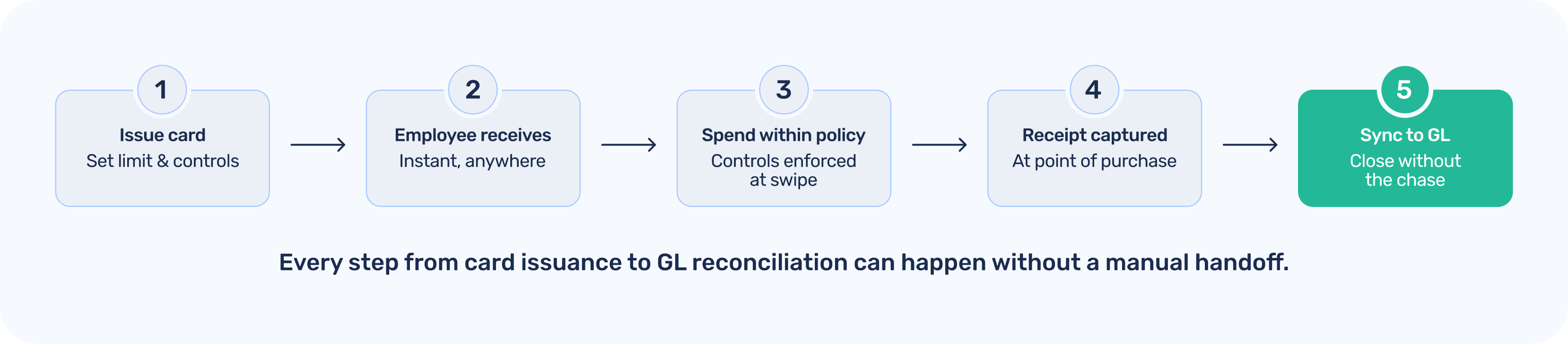
Extend is a spend and expense management platform built on top of the corporate card your company already uses. There’s no need to switch banks or open a new account. If your company has a Visa or Mastercard commercial card with a supported issuing bank, you can start issuing virtual cards through Extend today.
For distributed teams specifically, Extend provides:
The result is an expense program that works as well for an employee in Austin as it does for one in Amsterdam. Finance gets the visibility and control they need. Employees get the speed and simplicity they want.
Extend gives distributed finance teams instant virtual card issuance, built-in controls, and seamless accounting integrations — all on top of the corporate card you already have.
Dawn Lewis
Controller at Couranto
Bridget Cobb
Staff Accountant at Healthstream
Brittany Nolan
Sr. Product Marketing Manager at Extend (moderator)

When a company is small and centrally located, a handful of physical corporate cards is a workable solution. Someone needs to make a purchase; they grab a card from the office, get a receipt, and hand it back. It's an inconvenient but manageable process. The problem is that it breaks at scale — and it breaks faster when teams are distributed.
Today, many finance teams are managing expense programs for employees across dozens of cities, sometimes across continents. The old system wasn’t built for this reality, and the gaps show up every month: missing receipts, personal cards waiting for reimbursement, shared card numbers emailed in plain text, and a close process that feels like detective work.
This clearly isn’t a people problem. It’s a tooling problem. And virtual cards are increasingly the way finance teams at distributed companies are solving it.
Physical corporate cards have three core limitations that remote work makes worse:
1. Geography: Mailing a physical card to a new hire in another city or another country takes days. Meanwhile, the employee might need to book software, pay for a client dinner, or order supplies today. The path of least resistance becomes the personal card, which means reimbursement requests pile up on the finance team’s desk.
2. Shared access: When teams share a single card for departmental spend, you lose visibility into who spent what. A card number shared over Slack or email is a security risk waiting to happen. And when unauthorized charges appear, the audit trail is a mess.
3. No built-in controls: A physical card carries its limit, and that’s it. There’s no way to say “this card is only for SaaS subscriptions up to $500 per month” or “this card expires after the conference.” Every limit enforcement has to happen reactively, after the charge appears on the statement.
A virtual card is a card number with a CVV and expiration date that exists digitally. It can be created in seconds and delivered to any employee, anywhere, via email or app. There’s no physical card to mail, no waiting period, and no need to share a single number across a department.
But the real value isn’t the format. It’s the control layer that comes with it. Unlike a physical card, a virtual card is way more beneficial since it can be issued with:
This means the policy is in the card, not in a policy document that employees may or may not have read. Finance teams move from after-the-fact monitoring to proactive control — without adding friction to the employee’s day.
One of the persistent frustrations in distributed expense management is the approval workflow. An employee needs to make a purchase, sends a Slack message or email to a manager, waits for a reply, and by then, the meeting has started, or the deal has moved on. So they put it on a personal card and promise to submit an expense report later.
Virtual cards change this dynamic. When a manager issues a virtual card for a specific purpose — say, $500 for a software trial or $1,200 for client meals during a visit — the approval happens once, upfront, and the card enforces it automatically. The employee doesn’t have to ask again every time. The manager doesn’t have to monitor the feed.
Ask any controller what the most time-consuming part of month-end close is, and “chasing receipts” will be near the top of the list. Employees forget to submit them. By the time finance sends a reminder, the receipt has been deleted, or the transaction is weeks old.
A modern virtual card platform, like Extend, solves this by allowing employees to attach receipts to the transaction itself. When a charge posts, the employee gets an automated prompt to upload a receipt — via mobile, email, or the platform’s app. The receipt is matched to the transaction in real time, not at the end of the month.
The final bottleneck in most distributed expense programs is getting spend data into the general ledger accurately. Employees submit reports in different formats. Coding varies by person. Finance teams spend close week manually reassigning GL codes, verifying vendor names, and splitting transactions.
Virtual card platforms that integrate directly with accounting systems short-circuit most of this work. When you connect Extend to QuickBooks Online, QuickBooks Desktop, NetSuite, Xero, Sage Intacct, or Microsoft Dynamics 365 Business Central, transaction data — including the receipt, the amount, the merchant, and any custom fields the employee captured — flows directly into the ledger so finance doesn’t need to re-enter anything.
Extend’s Additional Fields for Expense Capture take this further. Finance teams can define custom data fields that employees complete at the time of purchase — cost center, project code, job number, whatever matters to your chart of accounts. By the time the transaction hits the accounting integration, it’s already fully coded.
Extend’s Saved Views also let finance teams segment virtual card spend by department, cost center, or custom field without exporting to a spreadsheet. Simply filter by cardholder, date range, merchant category, or any additional field you’ve configured and see a clean summary ready for review or export.
The most common mistake finance teams make when rolling out a virtual card program is treating it as a one-to-one swap for physical cards: issue a virtual card to each employee and call it done. The real value comes from designing card issuance around workflows.
Here are a few patterns that work well for distributed teams:
Extend is a spend and expense management platform built on top of the corporate card your company already uses. There’s no need to switch banks or open a new account. If your company has a Visa or Mastercard commercial card with a supported issuing bank, you can start issuing virtual cards through Extend today.
For distributed teams specifically, Extend provides:
The result is an expense program that works as well for an employee in Austin as it does for one in Amsterdam. Finance gets the visibility and control they need. Employees get the speed and simplicity they want.
Extend gives distributed finance teams instant virtual card issuance, built-in controls, and seamless accounting integrations — all on top of the corporate card you already have.
When a company is small and centrally located, a handful of physical corporate cards is a workable solution. Someone needs to make a purchase; they grab a card from the office, get a receipt, and hand it back. It's an inconvenient but manageable process. The problem is that it breaks at scale — and it breaks faster when teams are distributed.
Today, many finance teams are managing expense programs for employees across dozens of cities, sometimes across continents. The old system wasn’t built for this reality, and the gaps show up every month: missing receipts, personal cards waiting for reimbursement, shared card numbers emailed in plain text, and a close process that feels like detective work.
This clearly isn’t a people problem. It’s a tooling problem. And virtual cards are increasingly the way finance teams at distributed companies are solving it.
Physical corporate cards have three core limitations that remote work makes worse:
1. Geography: Mailing a physical card to a new hire in another city or another country takes days. Meanwhile, the employee might need to book software, pay for a client dinner, or order supplies today. The path of least resistance becomes the personal card, which means reimbursement requests pile up on the finance team’s desk.
2. Shared access: When teams share a single card for departmental spend, you lose visibility into who spent what. A card number shared over Slack or email is a security risk waiting to happen. And when unauthorized charges appear, the audit trail is a mess.
3. No built-in controls: A physical card carries its limit, and that’s it. There’s no way to say “this card is only for SaaS subscriptions up to $500 per month” or “this card expires after the conference.” Every limit enforcement has to happen reactively, after the charge appears on the statement.
A virtual card is a card number with a CVV and expiration date that exists digitally. It can be created in seconds and delivered to any employee, anywhere, via email or app. There’s no physical card to mail, no waiting period, and no need to share a single number across a department.
But the real value isn’t the format. It’s the control layer that comes with it. Unlike a physical card, a virtual card is way more beneficial since it can be issued with:
This means the policy is in the card, not in a policy document that employees may or may not have read. Finance teams move from after-the-fact monitoring to proactive control — without adding friction to the employee’s day.
One of the persistent frustrations in distributed expense management is the approval workflow. An employee needs to make a purchase, sends a Slack message or email to a manager, waits for a reply, and by then, the meeting has started, or the deal has moved on. So they put it on a personal card and promise to submit an expense report later.
Virtual cards change this dynamic. When a manager issues a virtual card for a specific purpose — say, $500 for a software trial or $1,200 for client meals during a visit — the approval happens once, upfront, and the card enforces it automatically. The employee doesn’t have to ask again every time. The manager doesn’t have to monitor the feed.
Ask any controller what the most time-consuming part of month-end close is, and “chasing receipts” will be near the top of the list. Employees forget to submit them. By the time finance sends a reminder, the receipt has been deleted, or the transaction is weeks old.
A modern virtual card platform, like Extend, solves this by allowing employees to attach receipts to the transaction itself. When a charge posts, the employee gets an automated prompt to upload a receipt — via mobile, email, or the platform’s app. The receipt is matched to the transaction in real time, not at the end of the month.
The final bottleneck in most distributed expense programs is getting spend data into the general ledger accurately. Employees submit reports in different formats. Coding varies by person. Finance teams spend close week manually reassigning GL codes, verifying vendor names, and splitting transactions.
Virtual card platforms that integrate directly with accounting systems short-circuit most of this work. When you connect Extend to QuickBooks Online, QuickBooks Desktop, NetSuite, Xero, Sage Intacct, or Microsoft Dynamics 365 Business Central, transaction data — including the receipt, the amount, the merchant, and any custom fields the employee captured — flows directly into the ledger so finance doesn’t need to re-enter anything.
Extend’s Additional Fields for Expense Capture take this further. Finance teams can define custom data fields that employees complete at the time of purchase — cost center, project code, job number, whatever matters to your chart of accounts. By the time the transaction hits the accounting integration, it’s already fully coded.
Extend’s Saved Views also let finance teams segment virtual card spend by department, cost center, or custom field without exporting to a spreadsheet. Simply filter by cardholder, date range, merchant category, or any additional field you’ve configured and see a clean summary ready for review or export.
The most common mistake finance teams make when rolling out a virtual card program is treating it as a one-to-one swap for physical cards: issue a virtual card to each employee and call it done. The real value comes from designing card issuance around workflows.
Here are a few patterns that work well for distributed teams:
Extend is a spend and expense management platform built on top of the corporate card your company already uses. There’s no need to switch banks or open a new account. If your company has a Visa or Mastercard commercial card with a supported issuing bank, you can start issuing virtual cards through Extend today.
For distributed teams specifically, Extend provides:
The result is an expense program that works as well for an employee in Austin as it does for one in Amsterdam. Finance gets the visibility and control they need. Employees get the speed and simplicity they want.
Extend gives distributed finance teams instant virtual card issuance, built-in controls, and seamless accounting integrations — all on top of the corporate card you already have.

When a company is small and centrally located, a handful of physical corporate cards is a workable solution. Someone needs to make a purchase; they grab a card from the office, get a receipt, and hand it back. It's an inconvenient but manageable process. The problem is that it breaks at scale — and it breaks faster when teams are distributed.
Today, many finance teams are managing expense programs for employees across dozens of cities, sometimes across continents. The old system wasn’t built for this reality, and the gaps show up every month: missing receipts, personal cards waiting for reimbursement, shared card numbers emailed in plain text, and a close process that feels like detective work.
This clearly isn’t a people problem. It’s a tooling problem. And virtual cards are increasingly the way finance teams at distributed companies are solving it.
Physical corporate cards have three core limitations that remote work makes worse:
1. Geography: Mailing a physical card to a new hire in another city or another country takes days. Meanwhile, the employee might need to book software, pay for a client dinner, or order supplies today. The path of least resistance becomes the personal card, which means reimbursement requests pile up on the finance team’s desk.
2. Shared access: When teams share a single card for departmental spend, you lose visibility into who spent what. A card number shared over Slack or email is a security risk waiting to happen. And when unauthorized charges appear, the audit trail is a mess.
3. No built-in controls: A physical card carries its limit, and that’s it. There’s no way to say “this card is only for SaaS subscriptions up to $500 per month” or “this card expires after the conference.” Every limit enforcement has to happen reactively, after the charge appears on the statement.
A virtual card is a card number with a CVV and expiration date that exists digitally. It can be created in seconds and delivered to any employee, anywhere, via email or app. There’s no physical card to mail, no waiting period, and no need to share a single number across a department.
But the real value isn’t the format. It’s the control layer that comes with it. Unlike a physical card, a virtual card is way more beneficial since it can be issued with:
This means the policy is in the card, not in a policy document that employees may or may not have read. Finance teams move from after-the-fact monitoring to proactive control — without adding friction to the employee’s day.
One of the persistent frustrations in distributed expense management is the approval workflow. An employee needs to make a purchase, sends a Slack message or email to a manager, waits for a reply, and by then, the meeting has started, or the deal has moved on. So they put it on a personal card and promise to submit an expense report later.
Virtual cards change this dynamic. When a manager issues a virtual card for a specific purpose — say, $500 for a software trial or $1,200 for client meals during a visit — the approval happens once, upfront, and the card enforces it automatically. The employee doesn’t have to ask again every time. The manager doesn’t have to monitor the feed.
Ask any controller what the most time-consuming part of month-end close is, and “chasing receipts” will be near the top of the list. Employees forget to submit them. By the time finance sends a reminder, the receipt has been deleted, or the transaction is weeks old.
A modern virtual card platform, like Extend, solves this by allowing employees to attach receipts to the transaction itself. When a charge posts, the employee gets an automated prompt to upload a receipt — via mobile, email, or the platform’s app. The receipt is matched to the transaction in real time, not at the end of the month.
The final bottleneck in most distributed expense programs is getting spend data into the general ledger accurately. Employees submit reports in different formats. Coding varies by person. Finance teams spend close week manually reassigning GL codes, verifying vendor names, and splitting transactions.
Virtual card platforms that integrate directly with accounting systems short-circuit most of this work. When you connect Extend to QuickBooks Online, QuickBooks Desktop, NetSuite, Xero, Sage Intacct, or Microsoft Dynamics 365 Business Central, transaction data — including the receipt, the amount, the merchant, and any custom fields the employee captured — flows directly into the ledger so finance doesn’t need to re-enter anything.
Extend’s Additional Fields for Expense Capture take this further. Finance teams can define custom data fields that employees complete at the time of purchase — cost center, project code, job number, whatever matters to your chart of accounts. By the time the transaction hits the accounting integration, it’s already fully coded.
Extend’s Saved Views also let finance teams segment virtual card spend by department, cost center, or custom field without exporting to a spreadsheet. Simply filter by cardholder, date range, merchant category, or any additional field you’ve configured and see a clean summary ready for review or export.
The most common mistake finance teams make when rolling out a virtual card program is treating it as a one-to-one swap for physical cards: issue a virtual card to each employee and call it done. The real value comes from designing card issuance around workflows.
Here are a few patterns that work well for distributed teams:
Extend is a spend and expense management platform built on top of the corporate card your company already uses. There’s no need to switch banks or open a new account. If your company has a Visa or Mastercard commercial card with a supported issuing bank, you can start issuing virtual cards through Extend today.
For distributed teams specifically, Extend provides:
The result is an expense program that works as well for an employee in Austin as it does for one in Amsterdam. Finance gets the visibility and control they need. Employees get the speed and simplicity they want.
Extend gives distributed finance teams instant virtual card issuance, built-in controls, and seamless accounting integrations — all on top of the corporate card you already have.
Learn more about Extend and find out if it's the right solution for your business.


%201.png)


%201.png)
