




Talk to the experts
Learn more about Extend and find out if it's the right solution for your business.
June 4, 2026 4:40 PM

For most finance teams, month-end still means manually coding transactions, chasing down receipts, validating mileage claims, and reacting to declined transactions after the fact. Each task seems manageable on its own, but together, they create hours of repetitive work, and when errors slip through, the cost of fixing them is often higher than the task itself.
Extend is designed to reduce that operational overhead directly. From AI-powered transaction coding to verifying receipts to automatic mileage calculations, and low balance monitoring, Extend automates routine workflows, without requiring changes to the tools or processes your team already uses.
Here's what's new.
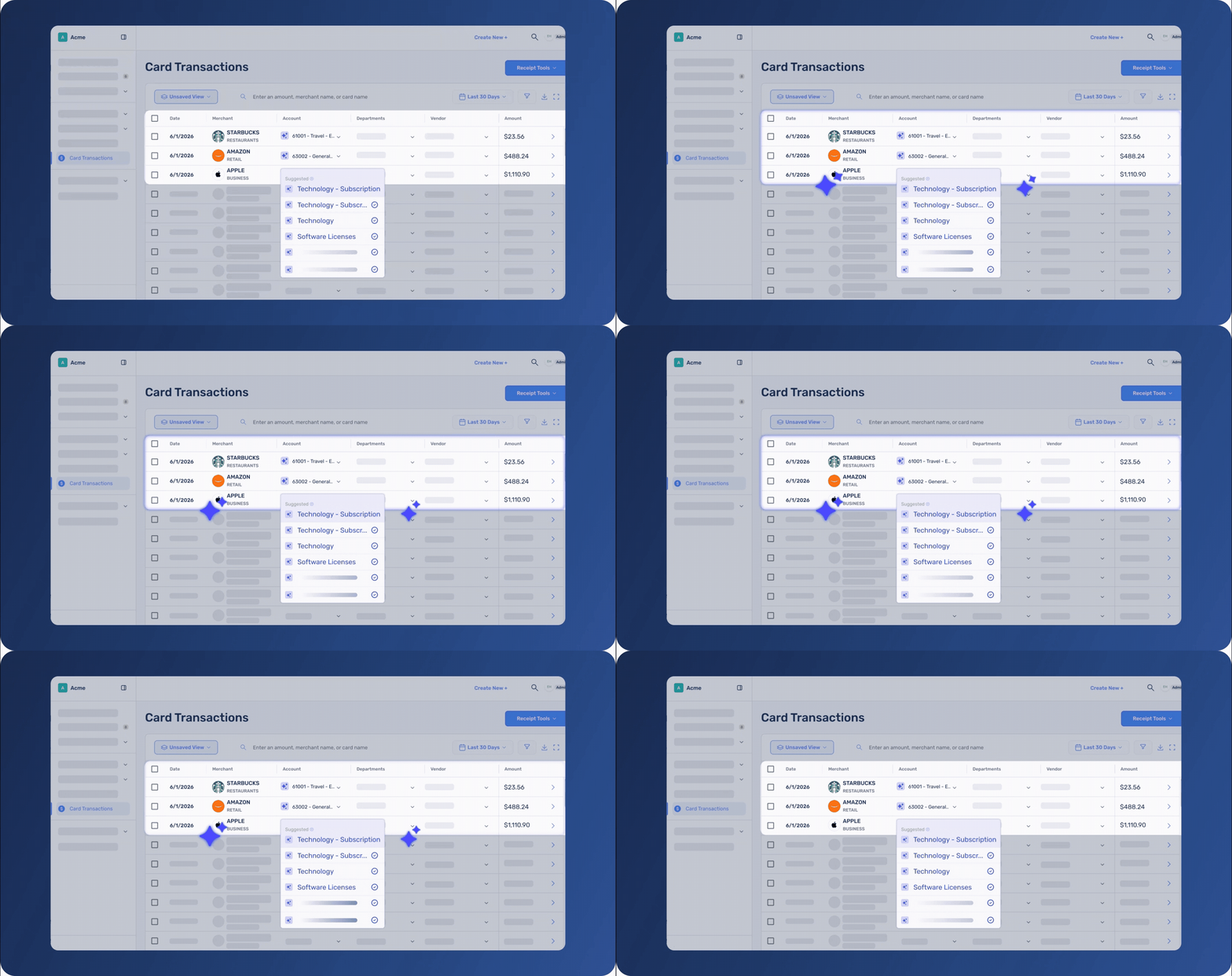
Coding transactions manually slows down month-end close and creates inconsistencies across teams. The same purchase can be categorized differently depending on who reviews it, leading to extra clean up and transactions later. Extend's AI expense category coding learns your organization's coding patterns to suggest and apply expense categories automatically. When reviewing transactions, users see up to five AI-powered suggestions directly in the category dropdown, helping them code transactions faster and more accurately with less searching. For organizations that want to move faster, Extend can also auto-code the account expense category based on past behavior. Every AI-generated categorization is clearly marked and can be reviewed or overridden at any time.
The more your team codes in Extend, the smarter and more accurate the recommendations become over time.
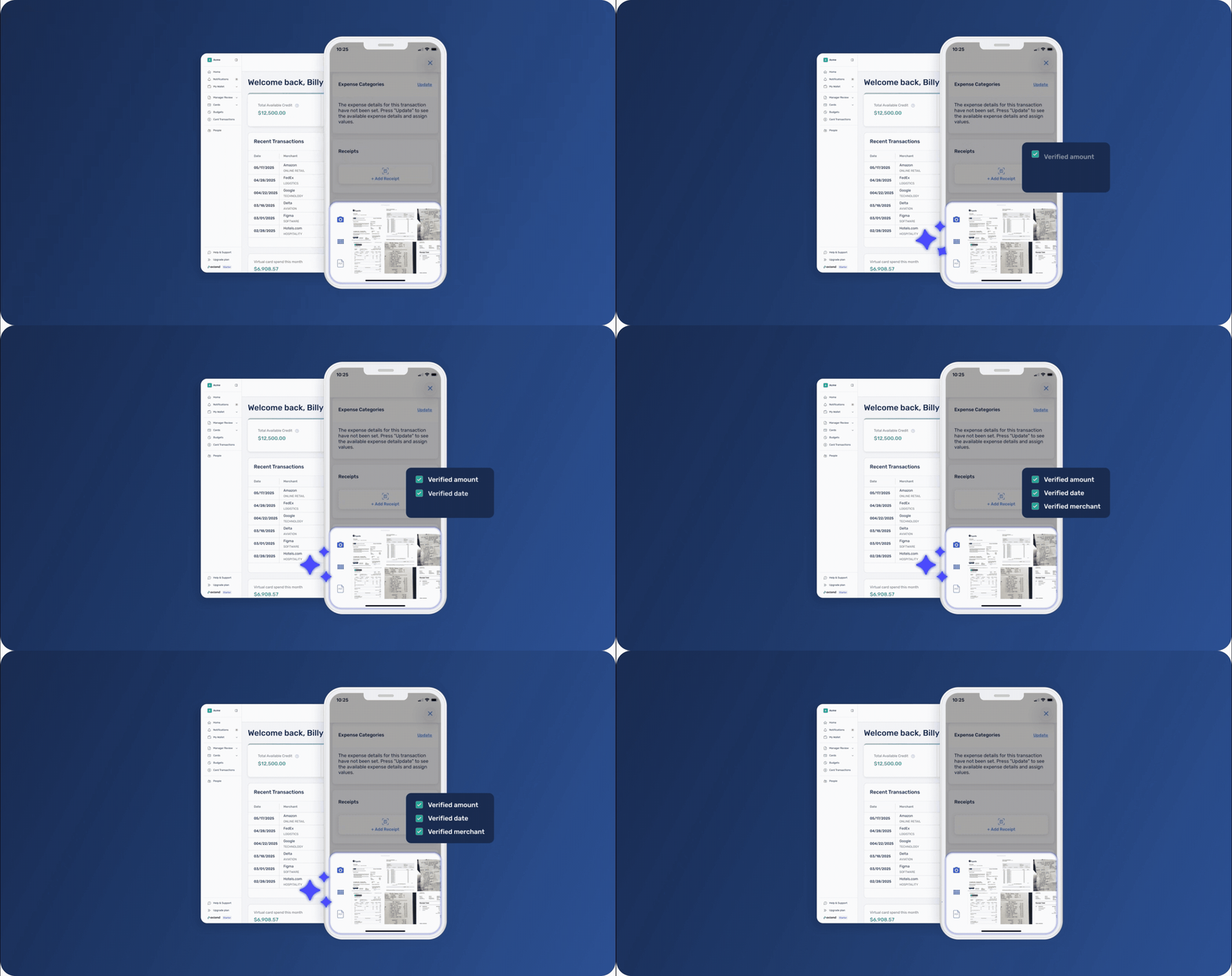
When a receipt is manually uploaded to a transaction, finance teams have had no reliable way to confirm it matches without reviewing it by hand. An unrelated receipt, an old image, or a duplicate could be attached to any transaction without being flagged.
Extend now automatically verifies every manually uploaded receipt. When a receipt is uploaded, Extend compares the merchant name, amount, and date against the transaction and surfaces a verification status directly on the transaction list and flyout. If something doesn’t match, the transaction is flagged for review, but users can still upload receipts without interruption.
This brings the same standard used for automatched receipts to every uploaded receipt across the platform, helping teams review expenses faster with more confidence.
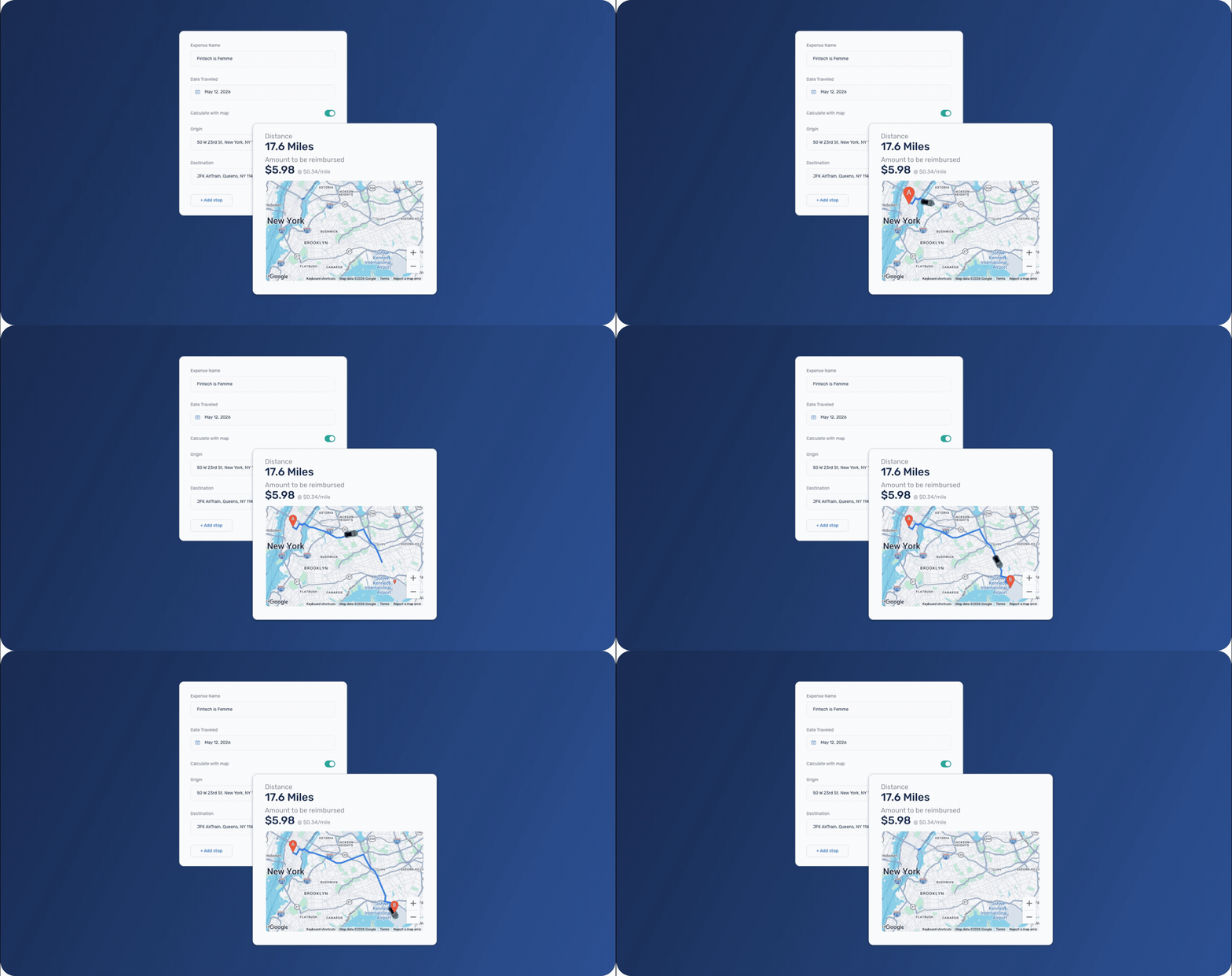
Mileage reimbursements have traditionally depended on employees estimating or entering the number of miles they drove. That creates extra work for finance teams who have no easy way to verify claims without looking up the route themselves.
Employees can now enter a start and end address and have the driving distance calculated automatically. Extend instantly calculates the reimbursement amount using your organization’s mileage rate, so employees can see exactly what they will be reimbursed before submitting.
Route details, calculated distance, and reimbursement amounts are stored with the reimbursement request, giving reviewers the details they need to review claims without leaving Extend.
Manual entry is still supported and clearly distinguished from map-calculated submissions.
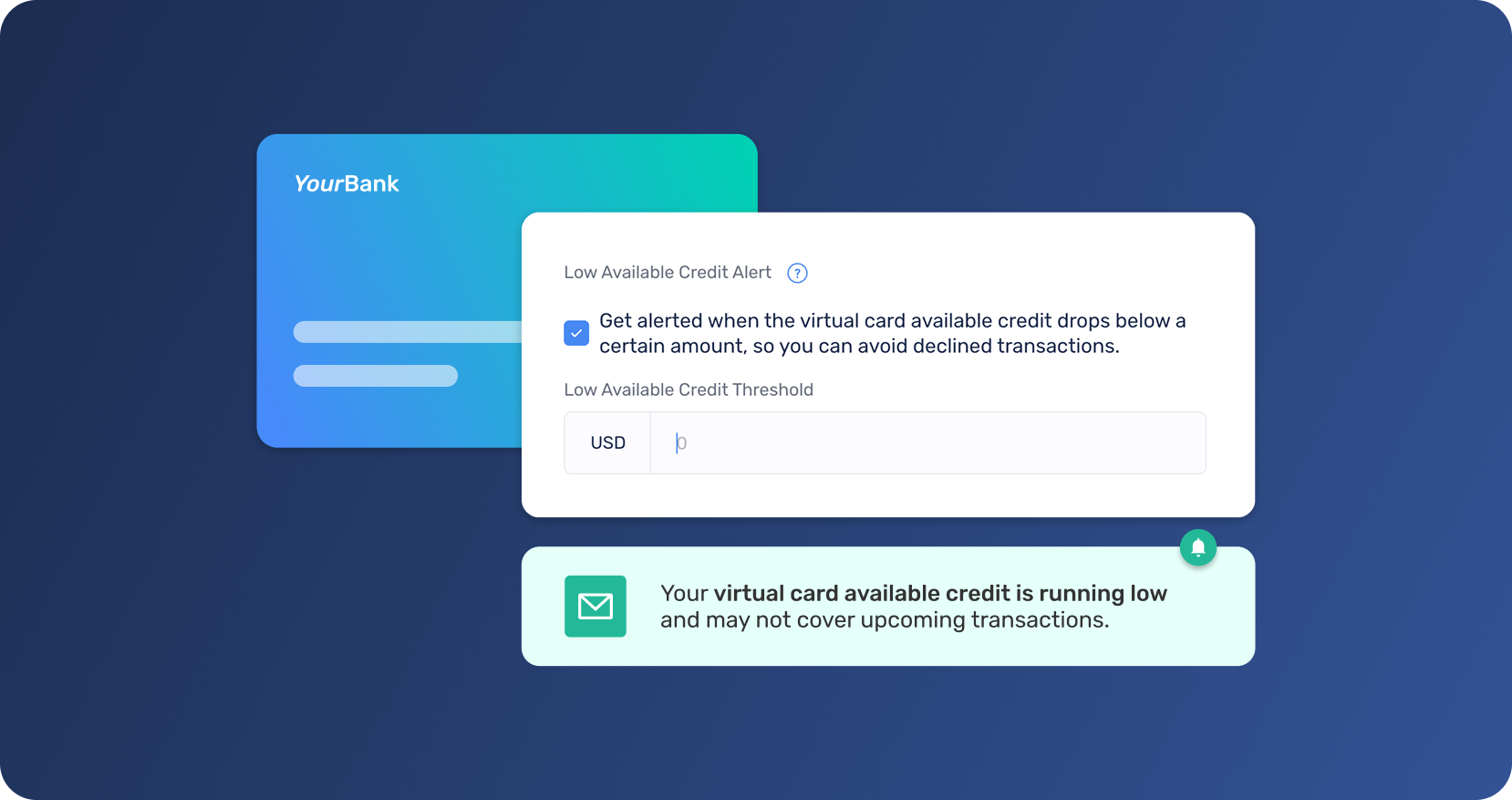
One of the most consistent pieces of feedback we hear from customers is that they want to know when a card balance is running low before it causes a problem. Until now, the first indication was often a declined transaction, by which point a vendor payment had already failed, or an employee was left without a working card.
Extend now lets users configure a low balance alert on any virtual card, so teams can take action before spend is interrupted. When a card's balance drops below the configured threshold, Extend sends an email and in-app notification to the card recipient giving them time to act before a transaction is affected.
Alerts can be configured directly from the virtual card flyout. When triggered, users receive both an email and an in-app notification.
Instead of manually checking balances across multiple cards, teams can stay ahead of potential issues automatically.
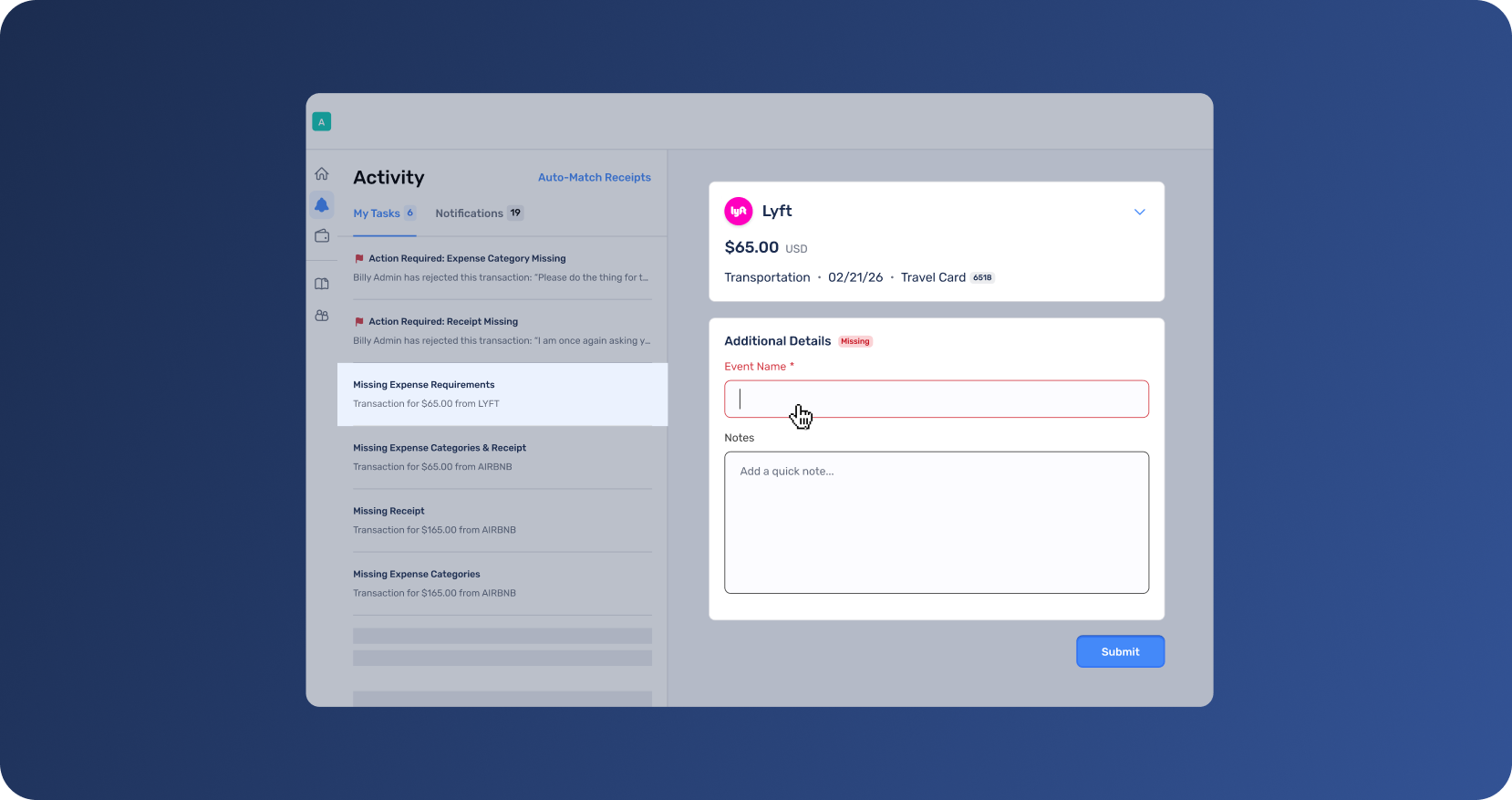
Different purchases require different context. A client dinner might need attendees, hotels may need trip details, and some transactions may require a quick note before they’re ready for review.
Extend helps organizations automatically request the right information based on the type of spend, so employees only see prompts that are actually relevant to their transaction. Instead of asking for extra information on every purchase,
Custom fields for expense capture can be completed directly from the activity page or transaction list, helping teams keep expenses moving without unnecessary follow-up.
These updates are designed to reduce the manual work that slows down expense management, from the first transaction to the final reconciliation.
Getting started takes just a few clicks:
The more your team works in Extend, the more these workflows help automate repetitive tasks behind the scenes.
Log in to your Extend account to explore these new capabilities, or learn more about how Extend supports modern expense management workflows.
If Extend has made a difference for your team, we'd love to hear about it. Share your experience on G2.
Some advanced capabilities are available to select bank customers and organizations on Pro and Enterprise plans. AI expense category coding is available for Pro and Enterprise organizations with an active accounting platform connection. Starter plan customers can upgrade in-app or contact their Admin or Account Manager to learn more.
Dawn Lewis
Controller at Couranto
Bridget Cobb
Staff Accountant at Healthstream
Brittany Nolan
Sr. Product Marketing Manager at Extend (moderator)

For most finance teams, month-end still means manually coding transactions, chasing down receipts, validating mileage claims, and reacting to declined transactions after the fact. Each task seems manageable on its own, but together, they create hours of repetitive work, and when errors slip through, the cost of fixing them is often higher than the task itself.
Extend is designed to reduce that operational overhead directly. From AI-powered transaction coding to verifying receipts to automatic mileage calculations, and low balance monitoring, Extend automates routine workflows, without requiring changes to the tools or processes your team already uses.
Here's what's new.
Coding transactions manually slows down month-end close and creates inconsistencies across teams. The same purchase can be categorized differently depending on who reviews it, leading to extra clean up and transactions later. Extend's AI expense category coding learns your organization's coding patterns to suggest and apply expense categories automatically. When reviewing transactions, users see up to five AI-powered suggestions directly in the category dropdown, helping them code transactions faster and more accurately with less searching. For organizations that want to move faster, Extend can also auto-code the account expense category based on past behavior. Every AI-generated categorization is clearly marked and can be reviewed or overridden at any time.
The more your team codes in Extend, the smarter and more accurate the recommendations become over time.
When a receipt is manually uploaded to a transaction, finance teams have had no reliable way to confirm it matches without reviewing it by hand. An unrelated receipt, an old image, or a duplicate could be attached to any transaction without being flagged.
Extend now automatically verifies every manually uploaded receipt. When a receipt is uploaded, Extend compares the merchant name, amount, and date against the transaction and surfaces a verification status directly on the transaction list and flyout. If something doesn’t match, the transaction is flagged for review, but users can still upload receipts without interruption.
This brings the same standard used for automatched receipts to every uploaded receipt across the platform, helping teams review expenses faster with more confidence.
Mileage reimbursements have traditionally depended on employees estimating or entering the number of miles they drove. That creates extra work for finance teams who have no easy way to verify claims without looking up the route themselves.
Employees can now enter a start and end address and have the driving distance calculated automatically. Extend instantly calculates the reimbursement amount using your organization’s mileage rate, so employees can see exactly what they will be reimbursed before submitting.
Route details, calculated distance, and reimbursement amounts are stored with the reimbursement request, giving reviewers the details they need to review claims without leaving Extend.
Manual entry is still supported and clearly distinguished from map-calculated submissions.
One of the most consistent pieces of feedback we hear from customers is that they want to know when a card balance is running low before it causes a problem. Until now, the first indication was often a declined transaction, by which point a vendor payment had already failed, or an employee was left without a working card.
Extend now lets users configure a low balance alert on any virtual card, so teams can take action before spend is interrupted. When a card's balance drops below the configured threshold, Extend sends an email and in-app notification to the card recipient giving them time to act before a transaction is affected.
Alerts can be configured directly from the virtual card flyout. When triggered, users receive both an email and an in-app notification.
Instead of manually checking balances across multiple cards, teams can stay ahead of potential issues automatically.
Different purchases require different context. A client dinner might need attendees, hotels may need trip details, and some transactions may require a quick note before they’re ready for review.
Extend helps organizations automatically request the right information based on the type of spend, so employees only see prompts that are actually relevant to their transaction. Instead of asking for extra information on every purchase,
Custom fields for expense capture can be completed directly from the activity page or transaction list, helping teams keep expenses moving without unnecessary follow-up.
These updates are designed to reduce the manual work that slows down expense management, from the first transaction to the final reconciliation.
Getting started takes just a few clicks:
The more your team works in Extend, the more these workflows help automate repetitive tasks behind the scenes.
Log in to your Extend account to explore these new capabilities, or learn more about how Extend supports modern expense management workflows.
If Extend has made a difference for your team, we'd love to hear about it. Share your experience on G2.
Some advanced capabilities are available to select bank customers and organizations on Pro and Enterprise plans. AI expense category coding is available for Pro and Enterprise organizations with an active accounting platform connection. Starter plan customers can upgrade in-app or contact their Admin or Account Manager to learn more.
For most finance teams, month-end still means manually coding transactions, chasing down receipts, validating mileage claims, and reacting to declined transactions after the fact. Each task seems manageable on its own, but together, they create hours of repetitive work, and when errors slip through, the cost of fixing them is often higher than the task itself.
Extend is designed to reduce that operational overhead directly. From AI-powered transaction coding to verifying receipts to automatic mileage calculations, and low balance monitoring, Extend automates routine workflows, without requiring changes to the tools or processes your team already uses.
Here's what's new.
Coding transactions manually slows down month-end close and creates inconsistencies across teams. The same purchase can be categorized differently depending on who reviews it, leading to extra clean up and transactions later. Extend's AI expense category coding learns your organization's coding patterns to suggest and apply expense categories automatically. When reviewing transactions, users see up to five AI-powered suggestions directly in the category dropdown, helping them code transactions faster and more accurately with less searching. For organizations that want to move faster, Extend can also auto-code the account expense category based on past behavior. Every AI-generated categorization is clearly marked and can be reviewed or overridden at any time.
The more your team codes in Extend, the smarter and more accurate the recommendations become over time.
When a receipt is manually uploaded to a transaction, finance teams have had no reliable way to confirm it matches without reviewing it by hand. An unrelated receipt, an old image, or a duplicate could be attached to any transaction without being flagged.
Extend now automatically verifies every manually uploaded receipt. When a receipt is uploaded, Extend compares the merchant name, amount, and date against the transaction and surfaces a verification status directly on the transaction list and flyout. If something doesn’t match, the transaction is flagged for review, but users can still upload receipts without interruption.
This brings the same standard used for automatched receipts to every uploaded receipt across the platform, helping teams review expenses faster with more confidence.
Mileage reimbursements have traditionally depended on employees estimating or entering the number of miles they drove. That creates extra work for finance teams who have no easy way to verify claims without looking up the route themselves.
Employees can now enter a start and end address and have the driving distance calculated automatically. Extend instantly calculates the reimbursement amount using your organization’s mileage rate, so employees can see exactly what they will be reimbursed before submitting.
Route details, calculated distance, and reimbursement amounts are stored with the reimbursement request, giving reviewers the details they need to review claims without leaving Extend.
Manual entry is still supported and clearly distinguished from map-calculated submissions.
One of the most consistent pieces of feedback we hear from customers is that they want to know when a card balance is running low before it causes a problem. Until now, the first indication was often a declined transaction, by which point a vendor payment had already failed, or an employee was left without a working card.
Extend now lets users configure a low balance alert on any virtual card, so teams can take action before spend is interrupted. When a card's balance drops below the configured threshold, Extend sends an email and in-app notification to the card recipient giving them time to act before a transaction is affected.
Alerts can be configured directly from the virtual card flyout. When triggered, users receive both an email and an in-app notification.
Instead of manually checking balances across multiple cards, teams can stay ahead of potential issues automatically.
Different purchases require different context. A client dinner might need attendees, hotels may need trip details, and some transactions may require a quick note before they’re ready for review.
Extend helps organizations automatically request the right information based on the type of spend, so employees only see prompts that are actually relevant to their transaction. Instead of asking for extra information on every purchase,
Custom fields for expense capture can be completed directly from the activity page or transaction list, helping teams keep expenses moving without unnecessary follow-up.
These updates are designed to reduce the manual work that slows down expense management, from the first transaction to the final reconciliation.
Getting started takes just a few clicks:
The more your team works in Extend, the more these workflows help automate repetitive tasks behind the scenes.
Log in to your Extend account to explore these new capabilities, or learn more about how Extend supports modern expense management workflows.
If Extend has made a difference for your team, we'd love to hear about it. Share your experience on G2.
Some advanced capabilities are available to select bank customers and organizations on Pro and Enterprise plans. AI expense category coding is available for Pro and Enterprise organizations with an active accounting platform connection. Starter plan customers can upgrade in-app or contact their Admin or Account Manager to learn more.
For most finance teams, month-end still means manually coding transactions, chasing down receipts, validating mileage claims, and reacting to declined transactions after the fact. Each task seems manageable on its own, but together, they create hours of repetitive work, and when errors slip through, the cost of fixing them is often higher than the task itself.
Extend is designed to reduce that operational overhead directly. From AI-powered transaction coding to verifying receipts to automatic mileage calculations, and low balance monitoring, Extend automates routine workflows, without requiring changes to the tools or processes your team already uses.
Here's what's new.
Coding transactions manually slows down month-end close and creates inconsistencies across teams. The same purchase can be categorized differently depending on who reviews it, leading to extra clean up and transactions later. Extend's AI expense category coding learns your organization's coding patterns to suggest and apply expense categories automatically. When reviewing transactions, users see up to five AI-powered suggestions directly in the category dropdown, helping them code transactions faster and more accurately with less searching. For organizations that want to move faster, Extend can also auto-code the account expense category based on past behavior. Every AI-generated categorization is clearly marked and can be reviewed or overridden at any time.
The more your team codes in Extend, the smarter and more accurate the recommendations become over time.
When a receipt is manually uploaded to a transaction, finance teams have had no reliable way to confirm it matches without reviewing it by hand. An unrelated receipt, an old image, or a duplicate could be attached to any transaction without being flagged.
Extend now automatically verifies every manually uploaded receipt. When a receipt is uploaded, Extend compares the merchant name, amount, and date against the transaction and surfaces a verification status directly on the transaction list and flyout. If something doesn’t match, the transaction is flagged for review, but users can still upload receipts without interruption.
This brings the same standard used for automatched receipts to every uploaded receipt across the platform, helping teams review expenses faster with more confidence.
Mileage reimbursements have traditionally depended on employees estimating or entering the number of miles they drove. That creates extra work for finance teams who have no easy way to verify claims without looking up the route themselves.
Employees can now enter a start and end address and have the driving distance calculated automatically. Extend instantly calculates the reimbursement amount using your organization’s mileage rate, so employees can see exactly what they will be reimbursed before submitting.
Route details, calculated distance, and reimbursement amounts are stored with the reimbursement request, giving reviewers the details they need to review claims without leaving Extend.
Manual entry is still supported and clearly distinguished from map-calculated submissions.
One of the most consistent pieces of feedback we hear from customers is that they want to know when a card balance is running low before it causes a problem. Until now, the first indication was often a declined transaction, by which point a vendor payment had already failed, or an employee was left without a working card.
Extend now lets users configure a low balance alert on any virtual card, so teams can take action before spend is interrupted. When a card's balance drops below the configured threshold, Extend sends an email and in-app notification to the card recipient giving them time to act before a transaction is affected.
Alerts can be configured directly from the virtual card flyout. When triggered, users receive both an email and an in-app notification.
Instead of manually checking balances across multiple cards, teams can stay ahead of potential issues automatically.
Different purchases require different context. A client dinner might need attendees, hotels may need trip details, and some transactions may require a quick note before they’re ready for review.
Extend helps organizations automatically request the right information based on the type of spend, so employees only see prompts that are actually relevant to their transaction. Instead of asking for extra information on every purchase,
Custom fields for expense capture can be completed directly from the activity page or transaction list, helping teams keep expenses moving without unnecessary follow-up.
These updates are designed to reduce the manual work that slows down expense management, from the first transaction to the final reconciliation.
Getting started takes just a few clicks:
The more your team works in Extend, the more these workflows help automate repetitive tasks behind the scenes.
Log in to your Extend account to explore these new capabilities, or learn more about how Extend supports modern expense management workflows.
If Extend has made a difference for your team, we'd love to hear about it. Share your experience on G2.
Some advanced capabilities are available to select bank customers and organizations on Pro and Enterprise plans. AI expense category coding is available for Pro and Enterprise organizations with an active accounting platform connection. Starter plan customers can upgrade in-app or contact their Admin or Account Manager to learn more.
Learn more about Extend and find out if it's the right solution for your business.


%201.png)


%201.png)
