



Talk to the experts
Learn more about Extend and find out if it's the right solution for your business.
June 17, 2026 8:00 AM

Every finance team has that moment: it is the last week of the month, and your controller is buried in spreadsheets — cross-referencing bank statements against expense reports, manually coding transactions, chasing down receipts for anything that looks wrong. The books will not close until all of it gets resolved.
The work is tedious, time-consuming, and largely repetitive. And yet most finance teams still do it by hand. There is a better way — but it requires rethinking what "automation" actually means for a finance function that cares about accuracy and control.
Month-end bottlenecks tend to cluster around the same activities regardless of company size.
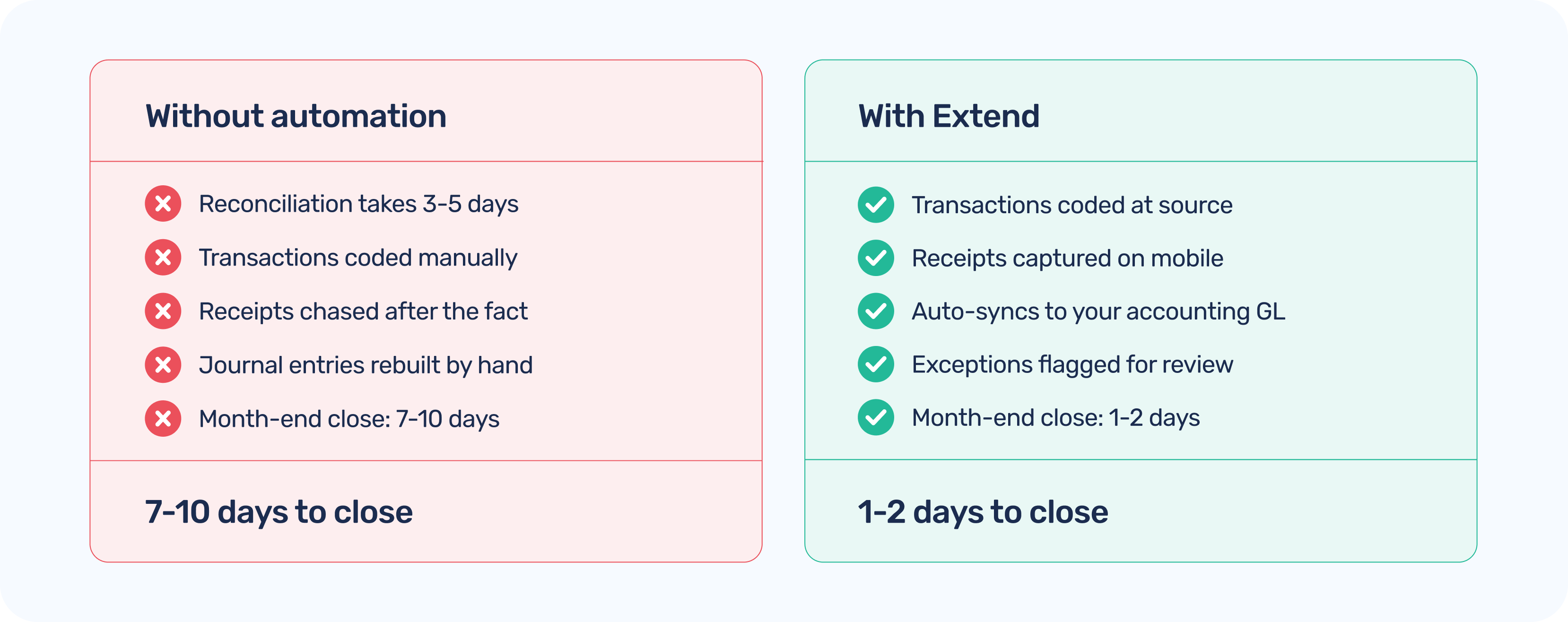
Reconciliation is the most time-intensive: matching bank transactions to your general ledger entries means pulling data from multiple sources, often formatted differently, and manually verifying that every line balances. A single bank account can take hours. Multiple cards or accounts across a growing company? Days.
Transaction coding — assigning the right GL account, cost center, department, or project code to each expense — is another major drain. When cardholders do not capture context at the time of spend, the accounting team has to reconstruct it after the fact. That reconstruction is slow, imprecise, and prone to error.
Journal entries are the final step before the close, and they inherit every error from the two steps above. If your source data is messy, your journal entries will be too — which means more review cycles before anything goes final.
Given how much time these tasks consume, why haven't more finance teams automated them? Part of it is concern about accuracy. Automation that runs without human review can propagate errors at scale — a miscoded transaction in an automated workflow becomes hundreds of miscoded transactions before anyone notices. For teams responsible for audit-ready financials, that is a real risk.
There is also the compliance dimension. Expense management sits at the intersection of internal controls and regulatory requirements. Finance teams need to demonstrate that every transaction was reviewed appropriately — and full automation can feel like giving up that evidence trail.
The good news: the right answer is not "automate everything" or "automate nothing." It is deciding, transaction by transaction or category by category, where human review adds genuine value and where it is just overhead.
The practical model for finance teams looks something like this. Routine, low-risk transactions — recurring vendor payments with consistent amounts, predictable employee expenses within policy limits, subscription charges — run through your accounting system automatically. They get coded, logged, and matched without anyone touching them.
Exception-based reviews are triggered when something deviates from the pattern: an unusual amount, a first-time vendor, a missing receipt, a transaction that does not match a purchase order. Those get flagged and routed to a human reviewer before they hit the books.
This approach delivers the efficiency gains of automation without surrendering oversight. Your accounting team shifts from doing the data entry to reviewing the exceptions — a better use of their judgment and expertise.
Most accounting automation problems trace back to messy source data. And most messy source data traces back to physical cards and uncontrolled spend.
When employees use personal credit cards or shared corporate cards, the transaction record is often just a merchant name and an amount. No GL code. No cost center. No receipt. The accounting team gets it days or weeks later and has to reconstruct the context from scratch.
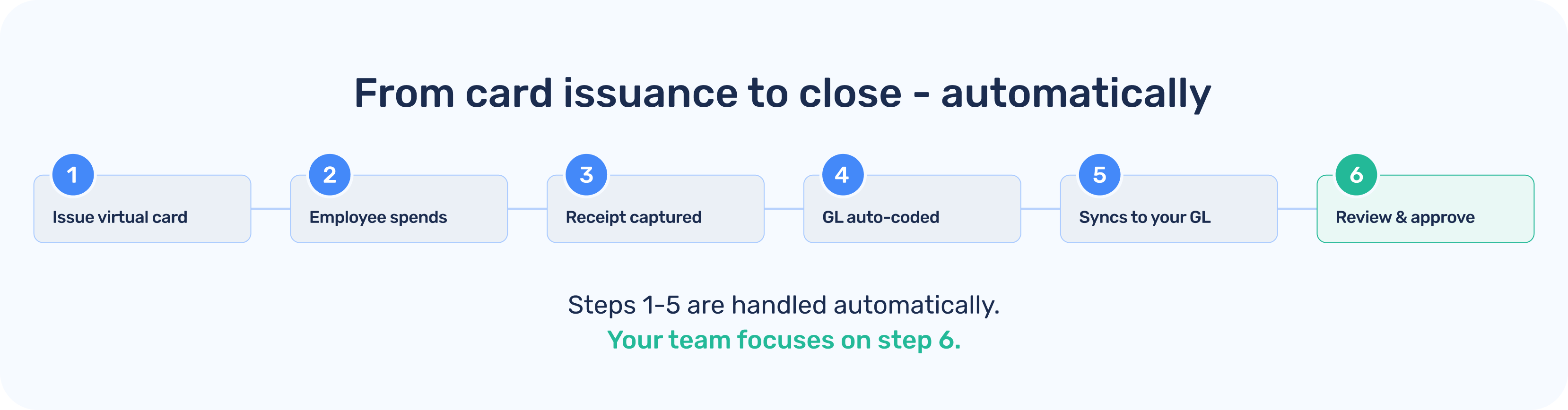
Virtual cards change this at the source. When a card is issued through Extend, it is already tied to a specific purpose — vendor, budget, project, or employee. Spend controls are set before the card is used. Receipts can be captured immediately via the mobile app.
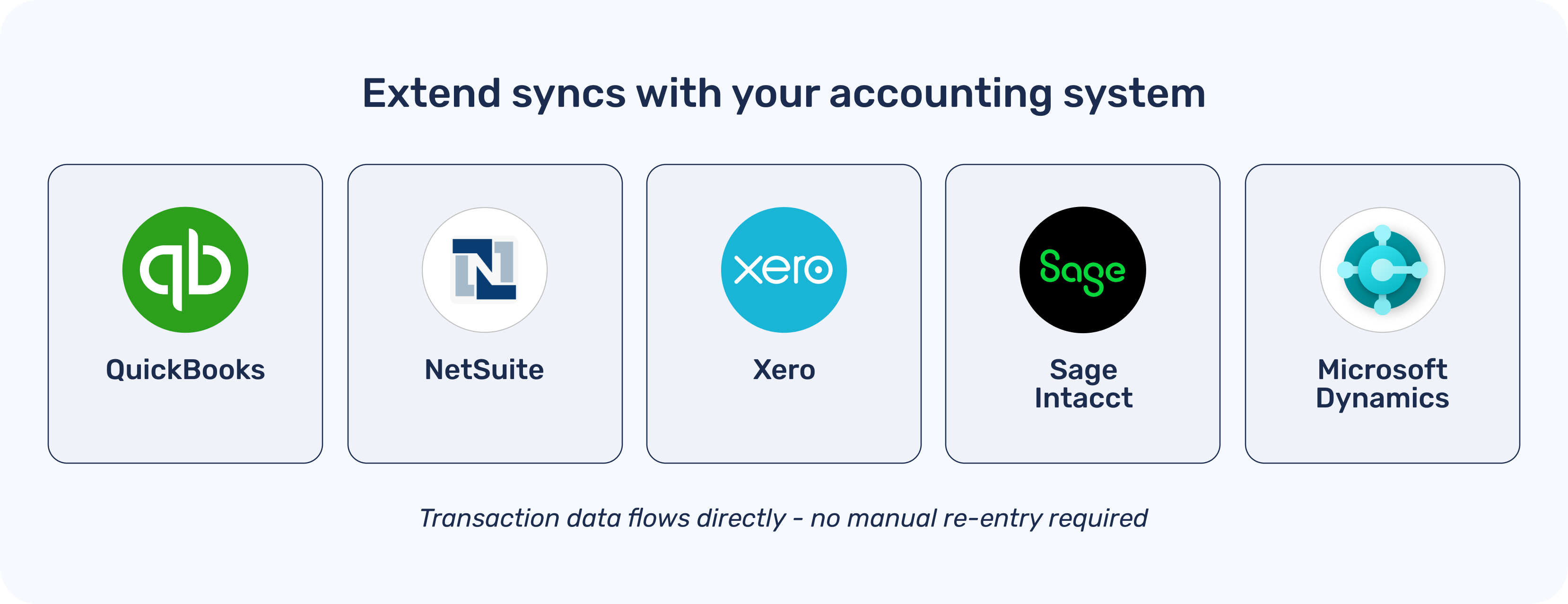
By the time that transaction hits your accounting system, it already carries the context your team needs to code it correctly. You are not reconstructing — you are confirming. Extend's accounting integrations sync transaction data directly into QuickBooks, NetSuite, Xero, Sage Intacct, and Microsoft Dynamics — with the coding set upstream. The result is reconciliation that is a review process rather than a data-entry process.
Finance teams using Extend see month-end close time cut dramatically — not because reconciliation gets skipped, but because the data going into it is already clean, coded, and matched. Your accounting team spends time reviewing and approving, not manually entering or correcting. Auditors get a clean trail from card issuance to journal entry. And your controllers stop dreading the last week of the month.
Accounting automation does not mean replacing your finance team's judgment. It means giving them better data, better tools, and more time for the decisions that actually require their expertise. Extend gives finance teams the infrastructure to get there: virtual cards that capture clean data at the point of spend, AI-powered coding and receipt capture, and direct integrations with the accounting systems you already use.
The goal is not a finance team that does less. It is a finance team that does what only humans can — and lets everything else run on its own.
Dawn Lewis
Controller at Couranto
Bridget Cobb
Staff Accountant at Healthstream
Brittany Nolan
Sr. Product Marketing Manager at Extend (moderator)

Every finance team has that moment: it is the last week of the month, and your controller is buried in spreadsheets — cross-referencing bank statements against expense reports, manually coding transactions, chasing down receipts for anything that looks wrong. The books will not close until all of it gets resolved.
The work is tedious, time-consuming, and largely repetitive. And yet most finance teams still do it by hand. There is a better way — but it requires rethinking what "automation" actually means for a finance function that cares about accuracy and control.
Month-end bottlenecks tend to cluster around the same activities regardless of company size.
Reconciliation is the most time-intensive: matching bank transactions to your general ledger entries means pulling data from multiple sources, often formatted differently, and manually verifying that every line balances. A single bank account can take hours. Multiple cards or accounts across a growing company? Days.
Transaction coding — assigning the right GL account, cost center, department, or project code to each expense — is another major drain. When cardholders do not capture context at the time of spend, the accounting team has to reconstruct it after the fact. That reconstruction is slow, imprecise, and prone to error.
Journal entries are the final step before the close, and they inherit every error from the two steps above. If your source data is messy, your journal entries will be too — which means more review cycles before anything goes final.
Given how much time these tasks consume, why haven't more finance teams automated them? Part of it is concern about accuracy. Automation that runs without human review can propagate errors at scale — a miscoded transaction in an automated workflow becomes hundreds of miscoded transactions before anyone notices. For teams responsible for audit-ready financials, that is a real risk.
There is also the compliance dimension. Expense management sits at the intersection of internal controls and regulatory requirements. Finance teams need to demonstrate that every transaction was reviewed appropriately — and full automation can feel like giving up that evidence trail.
The good news: the right answer is not "automate everything" or "automate nothing." It is deciding, transaction by transaction or category by category, where human review adds genuine value and where it is just overhead.
The practical model for finance teams looks something like this. Routine, low-risk transactions — recurring vendor payments with consistent amounts, predictable employee expenses within policy limits, subscription charges — run through your accounting system automatically. They get coded, logged, and matched without anyone touching them.
Exception-based reviews are triggered when something deviates from the pattern: an unusual amount, a first-time vendor, a missing receipt, a transaction that does not match a purchase order. Those get flagged and routed to a human reviewer before they hit the books.
This approach delivers the efficiency gains of automation without surrendering oversight. Your accounting team shifts from doing the data entry to reviewing the exceptions — a better use of their judgment and expertise.
Most accounting automation problems trace back to messy source data. And most messy source data traces back to physical cards and uncontrolled spend.
When employees use personal credit cards or shared corporate cards, the transaction record is often just a merchant name and an amount. No GL code. No cost center. No receipt. The accounting team gets it days or weeks later and has to reconstruct the context from scratch.
Virtual cards change this at the source. When a card is issued through Extend, it is already tied to a specific purpose — vendor, budget, project, or employee. Spend controls are set before the card is used. Receipts can be captured immediately via the mobile app.
By the time that transaction hits your accounting system, it already carries the context your team needs to code it correctly. You are not reconstructing — you are confirming. Extend's accounting integrations sync transaction data directly into QuickBooks, NetSuite, Xero, Sage Intacct, and Microsoft Dynamics — with the coding set upstream. The result is reconciliation that is a review process rather than a data-entry process.
Finance teams using Extend see month-end close time cut dramatically — not because reconciliation gets skipped, but because the data going into it is already clean, coded, and matched. Your accounting team spends time reviewing and approving, not manually entering or correcting. Auditors get a clean trail from card issuance to journal entry. And your controllers stop dreading the last week of the month.
Accounting automation does not mean replacing your finance team's judgment. It means giving them better data, better tools, and more time for the decisions that actually require their expertise. Extend gives finance teams the infrastructure to get there: virtual cards that capture clean data at the point of spend, AI-powered coding and receipt capture, and direct integrations with the accounting systems you already use.
The goal is not a finance team that does less. It is a finance team that does what only humans can — and lets everything else run on its own.
Every finance team has that moment: it is the last week of the month, and your controller is buried in spreadsheets — cross-referencing bank statements against expense reports, manually coding transactions, chasing down receipts for anything that looks wrong. The books will not close until all of it gets resolved.
The work is tedious, time-consuming, and largely repetitive. And yet most finance teams still do it by hand. There is a better way — but it requires rethinking what "automation" actually means for a finance function that cares about accuracy and control.
Month-end bottlenecks tend to cluster around the same activities regardless of company size.
Reconciliation is the most time-intensive: matching bank transactions to your general ledger entries means pulling data from multiple sources, often formatted differently, and manually verifying that every line balances. A single bank account can take hours. Multiple cards or accounts across a growing company? Days.
Transaction coding — assigning the right GL account, cost center, department, or project code to each expense — is another major drain. When cardholders do not capture context at the time of spend, the accounting team has to reconstruct it after the fact. That reconstruction is slow, imprecise, and prone to error.
Journal entries are the final step before the close, and they inherit every error from the two steps above. If your source data is messy, your journal entries will be too — which means more review cycles before anything goes final.
Given how much time these tasks consume, why haven't more finance teams automated them? Part of it is concern about accuracy. Automation that runs without human review can propagate errors at scale — a miscoded transaction in an automated workflow becomes hundreds of miscoded transactions before anyone notices. For teams responsible for audit-ready financials, that is a real risk.
There is also the compliance dimension. Expense management sits at the intersection of internal controls and regulatory requirements. Finance teams need to demonstrate that every transaction was reviewed appropriately — and full automation can feel like giving up that evidence trail.
The good news: the right answer is not "automate everything" or "automate nothing." It is deciding, transaction by transaction or category by category, where human review adds genuine value and where it is just overhead.
The practical model for finance teams looks something like this. Routine, low-risk transactions — recurring vendor payments with consistent amounts, predictable employee expenses within policy limits, subscription charges — run through your accounting system automatically. They get coded, logged, and matched without anyone touching them.
Exception-based reviews are triggered when something deviates from the pattern: an unusual amount, a first-time vendor, a missing receipt, a transaction that does not match a purchase order. Those get flagged and routed to a human reviewer before they hit the books.
This approach delivers the efficiency gains of automation without surrendering oversight. Your accounting team shifts from doing the data entry to reviewing the exceptions — a better use of their judgment and expertise.
Most accounting automation problems trace back to messy source data. And most messy source data traces back to physical cards and uncontrolled spend.
When employees use personal credit cards or shared corporate cards, the transaction record is often just a merchant name and an amount. No GL code. No cost center. No receipt. The accounting team gets it days or weeks later and has to reconstruct the context from scratch.
Virtual cards change this at the source. When a card is issued through Extend, it is already tied to a specific purpose — vendor, budget, project, or employee. Spend controls are set before the card is used. Receipts can be captured immediately via the mobile app.
By the time that transaction hits your accounting system, it already carries the context your team needs to code it correctly. You are not reconstructing — you are confirming. Extend's accounting integrations sync transaction data directly into QuickBooks, NetSuite, Xero, Sage Intacct, and Microsoft Dynamics — with the coding set upstream. The result is reconciliation that is a review process rather than a data-entry process.
Finance teams using Extend see month-end close time cut dramatically — not because reconciliation gets skipped, but because the data going into it is already clean, coded, and matched. Your accounting team spends time reviewing and approving, not manually entering or correcting. Auditors get a clean trail from card issuance to journal entry. And your controllers stop dreading the last week of the month.
Accounting automation does not mean replacing your finance team's judgment. It means giving them better data, better tools, and more time for the decisions that actually require their expertise. Extend gives finance teams the infrastructure to get there: virtual cards that capture clean data at the point of spend, AI-powered coding and receipt capture, and direct integrations with the accounting systems you already use.
The goal is not a finance team that does less. It is a finance team that does what only humans can — and lets everything else run on its own.

Every finance team has that moment: it is the last week of the month, and your controller is buried in spreadsheets — cross-referencing bank statements against expense reports, manually coding transactions, chasing down receipts for anything that looks wrong. The books will not close until all of it gets resolved.
The work is tedious, time-consuming, and largely repetitive. And yet most finance teams still do it by hand. There is a better way — but it requires rethinking what "automation" actually means for a finance function that cares about accuracy and control.
Month-end bottlenecks tend to cluster around the same activities regardless of company size.
Reconciliation is the most time-intensive: matching bank transactions to your general ledger entries means pulling data from multiple sources, often formatted differently, and manually verifying that every line balances. A single bank account can take hours. Multiple cards or accounts across a growing company? Days.
Transaction coding — assigning the right GL account, cost center, department, or project code to each expense — is another major drain. When cardholders do not capture context at the time of spend, the accounting team has to reconstruct it after the fact. That reconstruction is slow, imprecise, and prone to error.
Journal entries are the final step before the close, and they inherit every error from the two steps above. If your source data is messy, your journal entries will be too — which means more review cycles before anything goes final.
Given how much time these tasks consume, why haven't more finance teams automated them? Part of it is concern about accuracy. Automation that runs without human review can propagate errors at scale — a miscoded transaction in an automated workflow becomes hundreds of miscoded transactions before anyone notices. For teams responsible for audit-ready financials, that is a real risk.
There is also the compliance dimension. Expense management sits at the intersection of internal controls and regulatory requirements. Finance teams need to demonstrate that every transaction was reviewed appropriately — and full automation can feel like giving up that evidence trail.
The good news: the right answer is not "automate everything" or "automate nothing." It is deciding, transaction by transaction or category by category, where human review adds genuine value and where it is just overhead.
The practical model for finance teams looks something like this. Routine, low-risk transactions — recurring vendor payments with consistent amounts, predictable employee expenses within policy limits, subscription charges — run through your accounting system automatically. They get coded, logged, and matched without anyone touching them.
Exception-based reviews are triggered when something deviates from the pattern: an unusual amount, a first-time vendor, a missing receipt, a transaction that does not match a purchase order. Those get flagged and routed to a human reviewer before they hit the books.
This approach delivers the efficiency gains of automation without surrendering oversight. Your accounting team shifts from doing the data entry to reviewing the exceptions — a better use of their judgment and expertise.
Most accounting automation problems trace back to messy source data. And most messy source data traces back to physical cards and uncontrolled spend.
When employees use personal credit cards or shared corporate cards, the transaction record is often just a merchant name and an amount. No GL code. No cost center. No receipt. The accounting team gets it days or weeks later and has to reconstruct the context from scratch.
Virtual cards change this at the source. When a card is issued through Extend, it is already tied to a specific purpose — vendor, budget, project, or employee. Spend controls are set before the card is used. Receipts can be captured immediately via the mobile app.
By the time that transaction hits your accounting system, it already carries the context your team needs to code it correctly. You are not reconstructing — you are confirming. Extend's accounting integrations sync transaction data directly into QuickBooks, NetSuite, Xero, Sage Intacct, and Microsoft Dynamics — with the coding set upstream. The result is reconciliation that is a review process rather than a data-entry process.
Finance teams using Extend see month-end close time cut dramatically — not because reconciliation gets skipped, but because the data going into it is already clean, coded, and matched. Your accounting team spends time reviewing and approving, not manually entering or correcting. Auditors get a clean trail from card issuance to journal entry. And your controllers stop dreading the last week of the month.
Accounting automation does not mean replacing your finance team's judgment. It means giving them better data, better tools, and more time for the decisions that actually require their expertise. Extend gives finance teams the infrastructure to get there: virtual cards that capture clean data at the point of spend, AI-powered coding and receipt capture, and direct integrations with the accounting systems you already use.
The goal is not a finance team that does less. It is a finance team that does what only humans can — and lets everything else run on its own.
Learn more about Extend and find out if it's the right solution for your business.


%201.png)


%201.png)
