


.png)
.png)
Talk to the experts
Learn more about Extend and find out if it's the right solution for your business.
September 15, 2026 12:52 PM
For most finance teams, the month doesn't get hard during close week. It gets hard in the two weeks before it, when someone has to re-explain a policy call, retrace who touched a transaction and why, or dig through an export just to understand where the team overspent.
We hear a version of this from nearly every finance team we talk to. The work usually isn't difficult; it's scattered: sitting in a policy doc in another tab, a Slack thread nobody can find again, or a spreadsheet someone rebuilds every month. None of that shows up as "extra work" on a task list, but it adds up to hours lost every month, and it's the first thing to go sideways when someone needs a fast answer.
Our recent wave of updates focused on speed: help teams code faster, verify faster, close faster. That's still true, and we've shipped toward it. This quarter builds on that with proximity: putting the context finance already has (policy, history, trends) right where the decision gets made, instead of asking someone to go find it.
Here's what's new.

Spend policies usually live in a static doc, disconnected from the transactions they’re meant to govern. Reviewers end up reinterpreting it in another tab, on every transaction, sometimes inconsistently. Spenders often don't find out something's a problem until well after the fact.
Extend's AI Policy Agent brings that context into the platform to close the gap. Once an organization uploads their expense policy, Extend evaluates every cleared virtual or physical card transaction against that policy. Within the transaction window, users can easily see a "Here's your policy info" card with a plain-language read, like "likely non-reimbursable, no receipt attached."
This guidance can help spenders get an early nudge to add a receipt or business justification before it becomes a rejected expense. Reviewers get a consistent starting point instead of interpreting policy from scratch every time. The AI Policy Agent doesn't approve or reject anything. Approvals and rejections remain with your organization’s authorized reviewers.
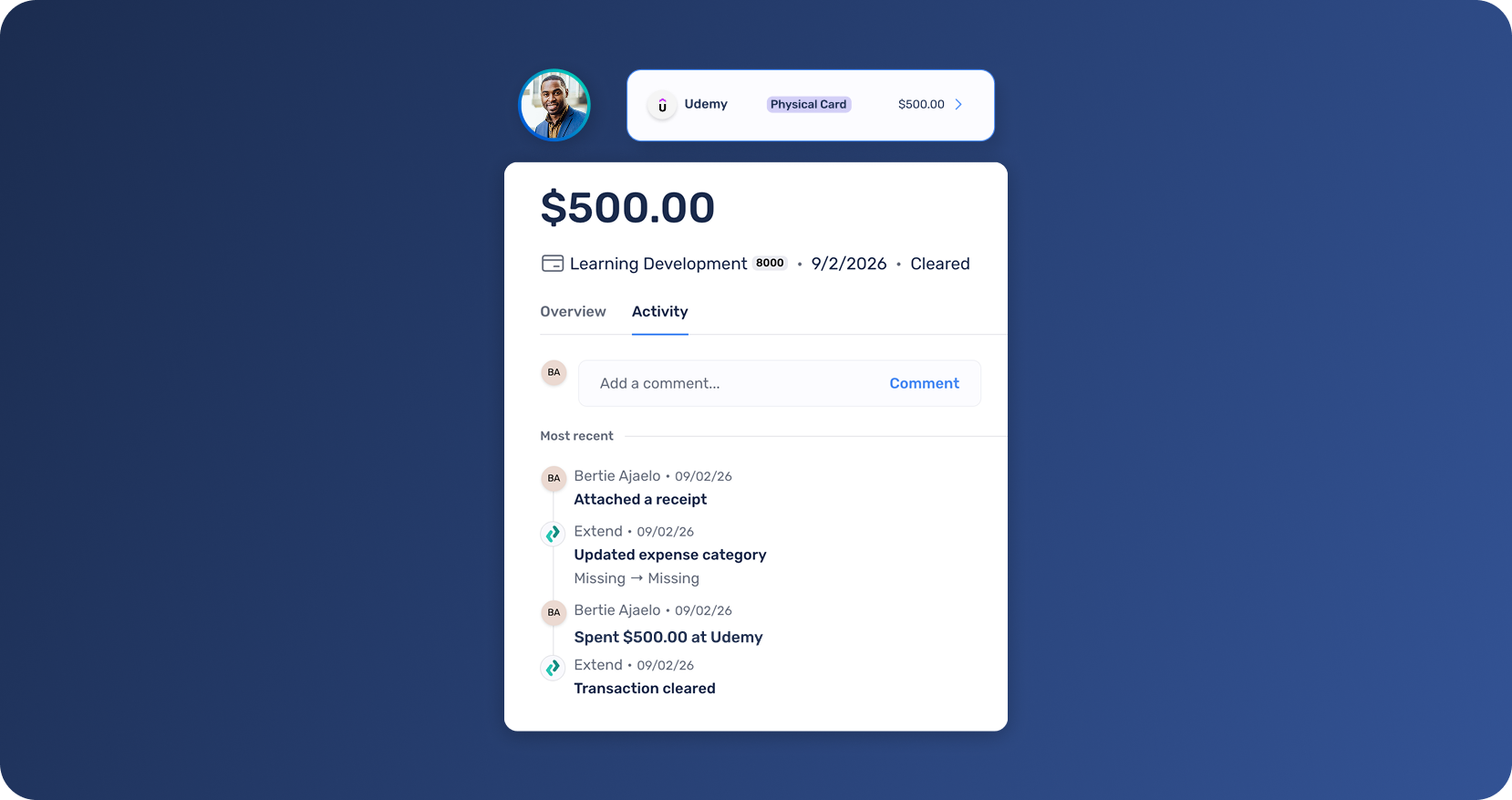
When transaction history is spread across messages and individual recollections, a simple question can turn into an investigation: Who updated the expense category? When was the receipt attached? Did a person make the change, or did an Extend AI Agent handle it automatically?
When you open a transaction, you’ll now see two tabs:
This includes actions such as updating expense coding or notes, attaching receipts, and other changes made throughout the transaction’s lifecycle.
Spenders, reviewers, and admins can now reference the same history without searching through messages or asking someone to reconstruct what happened. That makes it easier to answer questions, understand outstanding work, and see how a transaction reached its current state.
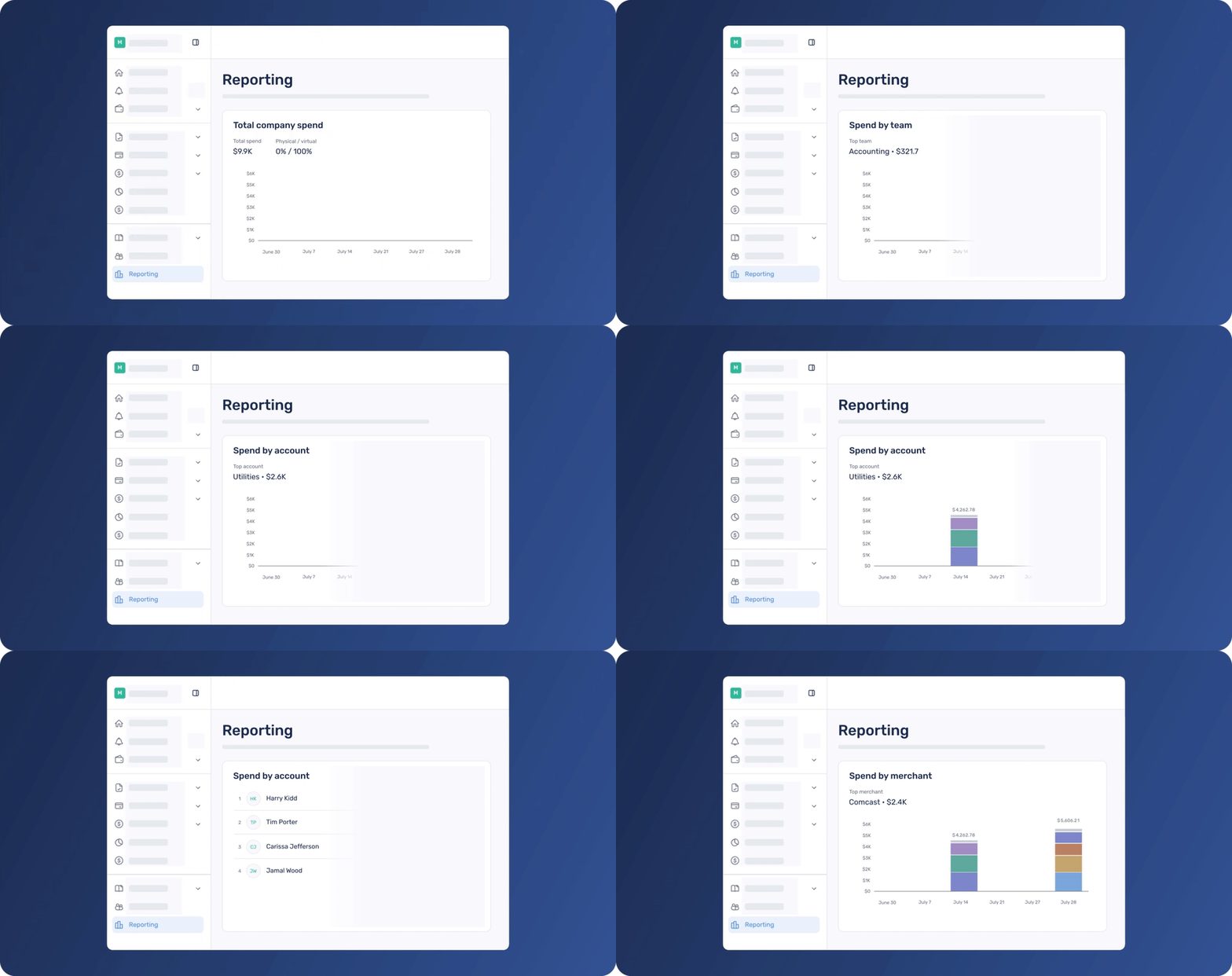
Answering a simple question like "where is our money going" or "who are our biggest spenders" usually means exporting transactions to a spreadsheet and building a pivot table by hand.
Extend's Reporting section gives finance teams an at-a-glance view of organizational spend directly in the platform. Explore spending trends across employees, teams, merchants, card accounts, and expense categories, making it easier to spot where money is going and catch unusual activity without touching a spreadsheet. Adjust the date range to see how spend shifts over any period.
Less time spent searching means more room for the work that actually matters. The AI Policy Agent helps teams interpret transactions with their spend policy in view. The Activity tab provides a reliable audit trail of how each transaction reached its current state. Reporting helps finance leaders step back and see where organizational spend is going.
None of these features replace the judgment of your team. Instead, they make the information behind those decisions easier to find and use.
The result is less time spent hunting for context and more time spent acting on it.
Less digging, more deciding doesn’t stop with what’s live today. We’re also piloting a new AI agent that takes manual work off your plate before it piles up at close.
We’re looking for a small group of customers to put the early experience to work and help shape what we build next. Pilot participants will receive early access at no cost, with no commitment to continue using the feature.
Interested in joining the pilot? Sign up here or contact your Extend Account Manager to learn more.
To get started
Log in to your Extend account to explore these updates, or learn more about how Extend supports modern expense management.
If Extend has made a difference for your team, we'd love to hear about it. Share your experience on G2.
Some capabilities are available to organizations on Pro and Enterprise plans. Starter plan customers can upgrade in-app or contact their Admin or Account Manager to learn more.
Not an Extend customer yet? Start free to explore the platform, or get a demo to see these Pro and Enterprise features in action.
Dawn Lewis
Controller at Couranto
Bridget Cobb
Staff Accountant at Healthstream
Brittany Nolan
Sr. Product Marketing Manager at Extend (moderator)

For most finance teams, the month doesn't get hard during close week. It gets hard in the two weeks before it, when someone has to re-explain a policy call, retrace who touched a transaction and why, or dig through an export just to understand where the team overspent.
We hear a version of this from nearly every finance team we talk to. The work usually isn't difficult; it's scattered: sitting in a policy doc in another tab, a Slack thread nobody can find again, or a spreadsheet someone rebuilds every month. None of that shows up as "extra work" on a task list, but it adds up to hours lost every month, and it's the first thing to go sideways when someone needs a fast answer.
Our recent wave of updates focused on speed: help teams code faster, verify faster, close faster. That's still true, and we've shipped toward it. This quarter builds on that with proximity: putting the context finance already has (policy, history, trends) right where the decision gets made, instead of asking someone to go find it.
Here's what's new.
Spend policies usually live in a static doc, disconnected from the transactions they’re meant to govern. Reviewers end up reinterpreting it in another tab, on every transaction, sometimes inconsistently. Spenders often don't find out something's a problem until well after the fact.
Extend's AI Policy Agent brings that context into the platform to close the gap. Once an organization uploads their expense policy, Extend evaluates every cleared virtual or physical card transaction against that policy. Within the transaction window, users can easily see a "Here's your policy info" card with a plain-language read, like "likely non-reimbursable, no receipt attached."
This guidance can help spenders get an early nudge to add a receipt or business justification before it becomes a rejected expense. Reviewers get a consistent starting point instead of interpreting policy from scratch every time. The AI Policy Agent doesn't approve or reject anything. Approvals and rejections remain with your organization’s authorized reviewers.
When transaction history is spread across messages and individual recollections, a simple question can turn into an investigation: Who updated the expense category? When was the receipt attached? Did a person make the change, or did an Extend AI Agent handle it automatically?
When you open a transaction, you’ll now see two tabs:
This includes actions such as updating expense coding or notes, attaching receipts, and other changes made throughout the transaction’s lifecycle.
Spenders, reviewers, and admins can now reference the same history without searching through messages or asking someone to reconstruct what happened. That makes it easier to answer questions, understand outstanding work, and see how a transaction reached its current state.
Answering a simple question like "where is our money going" or "who are our biggest spenders" usually means exporting transactions to a spreadsheet and building a pivot table by hand.
Extend's Reporting section gives finance teams an at-a-glance view of organizational spend directly in the platform. Explore spending trends across employees, teams, merchants, card accounts, and expense categories, making it easier to spot where money is going and catch unusual activity without touching a spreadsheet. Adjust the date range to see how spend shifts over any period.
Less time spent searching means more room for the work that actually matters. The AI Policy Agent helps teams interpret transactions with their spend policy in view. The Activity tab provides a reliable audit trail of how each transaction reached its current state. Reporting helps finance leaders step back and see where organizational spend is going.
None of these features replace the judgment of your team. Instead, they make the information behind those decisions easier to find and use.
The result is less time spent hunting for context and more time spent acting on it.
Less digging, more deciding doesn’t stop with what’s live today. We’re also piloting a new AI agent that takes manual work off your plate before it piles up at close.
We’re looking for a small group of customers to put the early experience to work and help shape what we build next. Pilot participants will receive early access at no cost, with no commitment to continue using the feature.
Interested in joining the pilot? Sign up here or contact your Extend Account Manager to learn more.
To get started
Log in to your Extend account to explore these updates, or learn more about how Extend supports modern expense management.
If Extend has made a difference for your team, we'd love to hear about it. Share your experience on G2.
Some capabilities are available to organizations on Pro and Enterprise plans. Starter plan customers can upgrade in-app or contact their Admin or Account Manager to learn more.
Not an Extend customer yet? Start free to explore the platform, or get a demo to see these Pro and Enterprise features in action.
For most finance teams, the month doesn't get hard during close week. It gets hard in the two weeks before it, when someone has to re-explain a policy call, retrace who touched a transaction and why, or dig through an export just to understand where the team overspent.
We hear a version of this from nearly every finance team we talk to. The work usually isn't difficult; it's scattered: sitting in a policy doc in another tab, a Slack thread nobody can find again, or a spreadsheet someone rebuilds every month. None of that shows up as "extra work" on a task list, but it adds up to hours lost every month, and it's the first thing to go sideways when someone needs a fast answer.
Our recent wave of updates focused on speed: help teams code faster, verify faster, close faster. That's still true, and we've shipped toward it. This quarter builds on that with proximity: putting the context finance already has (policy, history, trends) right where the decision gets made, instead of asking someone to go find it.
Here's what's new.
Spend policies usually live in a static doc, disconnected from the transactions they’re meant to govern. Reviewers end up reinterpreting it in another tab, on every transaction, sometimes inconsistently. Spenders often don't find out something's a problem until well after the fact.
Extend's AI Policy Agent brings that context into the platform to close the gap. Once an organization uploads their expense policy, Extend evaluates every cleared virtual or physical card transaction against that policy. Within the transaction window, users can easily see a "Here's your policy info" card with a plain-language read, like "likely non-reimbursable, no receipt attached."
This guidance can help spenders get an early nudge to add a receipt or business justification before it becomes a rejected expense. Reviewers get a consistent starting point instead of interpreting policy from scratch every time. The AI Policy Agent doesn't approve or reject anything. Approvals and rejections remain with your organization’s authorized reviewers.
When transaction history is spread across messages and individual recollections, a simple question can turn into an investigation: Who updated the expense category? When was the receipt attached? Did a person make the change, or did an Extend AI Agent handle it automatically?
When you open a transaction, you’ll now see two tabs:
This includes actions such as updating expense coding or notes, attaching receipts, and other changes made throughout the transaction’s lifecycle.
Spenders, reviewers, and admins can now reference the same history without searching through messages or asking someone to reconstruct what happened. That makes it easier to answer questions, understand outstanding work, and see how a transaction reached its current state.
Answering a simple question like "where is our money going" or "who are our biggest spenders" usually means exporting transactions to a spreadsheet and building a pivot table by hand.
Extend's Reporting section gives finance teams an at-a-glance view of organizational spend directly in the platform. Explore spending trends across employees, teams, merchants, card accounts, and expense categories, making it easier to spot where money is going and catch unusual activity without touching a spreadsheet. Adjust the date range to see how spend shifts over any period.
Less time spent searching means more room for the work that actually matters. The AI Policy Agent helps teams interpret transactions with their spend policy in view. The Activity tab provides a reliable audit trail of how each transaction reached its current state. Reporting helps finance leaders step back and see where organizational spend is going.
None of these features replace the judgment of your team. Instead, they make the information behind those decisions easier to find and use.
The result is less time spent hunting for context and more time spent acting on it.
Less digging, more deciding doesn’t stop with what’s live today. We’re also piloting a new AI agent that takes manual work off your plate before it piles up at close.
We’re looking for a small group of customers to put the early experience to work and help shape what we build next. Pilot participants will receive early access at no cost, with no commitment to continue using the feature.
Interested in joining the pilot? Sign up here or contact your Extend Account Manager to learn more.
To get started
Log in to your Extend account to explore these updates, or learn more about how Extend supports modern expense management.
If Extend has made a difference for your team, we'd love to hear about it. Share your experience on G2.
Some capabilities are available to organizations on Pro and Enterprise plans. Starter plan customers can upgrade in-app or contact their Admin or Account Manager to learn more.
Not an Extend customer yet? Start free to explore the platform, or get a demo to see these Pro and Enterprise features in action.
For most finance teams, the month doesn't get hard during close week. It gets hard in the two weeks before it, when someone has to re-explain a policy call, retrace who touched a transaction and why, or dig through an export just to understand where the team overspent.
We hear a version of this from nearly every finance team we talk to. The work usually isn't difficult; it's scattered: sitting in a policy doc in another tab, a Slack thread nobody can find again, or a spreadsheet someone rebuilds every month. None of that shows up as "extra work" on a task list, but it adds up to hours lost every month, and it's the first thing to go sideways when someone needs a fast answer.
Our recent wave of updates focused on speed: help teams code faster, verify faster, close faster. That's still true, and we've shipped toward it. This quarter builds on that with proximity: putting the context finance already has (policy, history, trends) right where the decision gets made, instead of asking someone to go find it.
Here's what's new.
Spend policies usually live in a static doc, disconnected from the transactions they’re meant to govern. Reviewers end up reinterpreting it in another tab, on every transaction, sometimes inconsistently. Spenders often don't find out something's a problem until well after the fact.
Extend's AI Policy Agent brings that context into the platform to close the gap. Once an organization uploads their expense policy, Extend evaluates every cleared virtual or physical card transaction against that policy. Within the transaction window, users can easily see a "Here's your policy info" card with a plain-language read, like "likely non-reimbursable, no receipt attached."
This guidance can help spenders get an early nudge to add a receipt or business justification before it becomes a rejected expense. Reviewers get a consistent starting point instead of interpreting policy from scratch every time. The AI Policy Agent doesn't approve or reject anything. Approvals and rejections remain with your organization’s authorized reviewers.
When transaction history is spread across messages and individual recollections, a simple question can turn into an investigation: Who updated the expense category? When was the receipt attached? Did a person make the change, or did an Extend AI Agent handle it automatically?
When you open a transaction, you’ll now see two tabs:
This includes actions such as updating expense coding or notes, attaching receipts, and other changes made throughout the transaction’s lifecycle.
Spenders, reviewers, and admins can now reference the same history without searching through messages or asking someone to reconstruct what happened. That makes it easier to answer questions, understand outstanding work, and see how a transaction reached its current state.
Answering a simple question like "where is our money going" or "who are our biggest spenders" usually means exporting transactions to a spreadsheet and building a pivot table by hand.
Extend's Reporting section gives finance teams an at-a-glance view of organizational spend directly in the platform. Explore spending trends across employees, teams, merchants, card accounts, and expense categories, making it easier to spot where money is going and catch unusual activity without touching a spreadsheet. Adjust the date range to see how spend shifts over any period.
Less time spent searching means more room for the work that actually matters. The AI Policy Agent helps teams interpret transactions with their spend policy in view. The Activity tab provides a reliable audit trail of how each transaction reached its current state. Reporting helps finance leaders step back and see where organizational spend is going.
None of these features replace the judgment of your team. Instead, they make the information behind those decisions easier to find and use.
The result is less time spent hunting for context and more time spent acting on it.
Less digging, more deciding doesn’t stop with what’s live today. We’re also piloting a new AI agent that takes manual work off your plate before it piles up at close.
We’re looking for a small group of customers to put the early experience to work and help shape what we build next. Pilot participants will receive early access at no cost, with no commitment to continue using the feature.
Interested in joining the pilot? Sign up here or contact your Extend Account Manager to learn more.
To get started
Log in to your Extend account to explore these updates, or learn more about how Extend supports modern expense management.
If Extend has made a difference for your team, we'd love to hear about it. Share your experience on G2.
Some capabilities are available to organizations on Pro and Enterprise plans. Starter plan customers can upgrade in-app or contact their Admin or Account Manager to learn more.
Not an Extend customer yet? Start free to explore the platform, or get a demo to see these Pro and Enterprise features in action.
Learn more about Extend and find out if it's the right solution for your business.


%201.png)


%201.png)
